Determination of parameters for spring stiffness
Note that the following steps are only necessary if the suggested values specified in the configuration do not lead to a satisfactory result.
Configuring some application types (e.g. tower sway and belly sway) requires defining the parameters "Spring stiffness between tower and traveling trolley" and "Damping ratio between tower and traveling trolley". If you do not already know these values, for example from mechanical simulations, or if the suggested tower sway values are not satisfactory, they can be determined as follows from the signal course of the oscillating system.
- Activate the "Support for parameter determination" ("From measurement") function in the "Basic settings" section in the "Anti-sway control" configuration menu.
- Load your application with the required payload and move the lifting axis to the position where the greatest sway of the tower occurs. With the "Tower sway" application type, for example, this is most often the highest point on the tower, and with the "Belly sway" application type in the middle of the tower. For the stiffness determination period, update the value for the "Distance between lifting and traveling trolley at measurement time" parameter to the lifting height at which the measurement is performed. If the application does not permit movement to the suggested lift position without the anti-sway control, the sway can occur even at lower lifting heights or with less load. Update the parameters accordingly. With the belly sway application type, the "Distance between lifting and traveling trolley at measurement time" is specified as half the tower height since the measurement must take place at this lifting height.
- Deactivate the anti-sway control to measure the sway by selecting the "Anti-sway control off" setting as the "Application type" or switch the anti-sway control off and on via the fieldbus interface in the optional process data under anti-sway control using the control word.
- A scope or trace recording of the torque is required to determine the required measured values [20], [21], and [22]. For the measurement, move the application at maximum possible acceleration and with maximum possible jerk. After the stop process, the tower continues to oscillate. This is visible in the torque of the drive if it remains in control. The oscillation serves as the basis for parameter determination. Alternatively, the oscillation amplitudes and period can also be determined via a video recording or an external measuring device.
- The following scope recording illustrates the torque and speed of a measurement run. After the stop process, the oscillations can be measured using the cursors, and the missing values can be determined. In this case:
- [20] Oscillation amplitude (1st peak) = 35
- [21] Oscillation amplitude (2nd peak) = 16.6
- [22] Oscillation period = 1.35 s
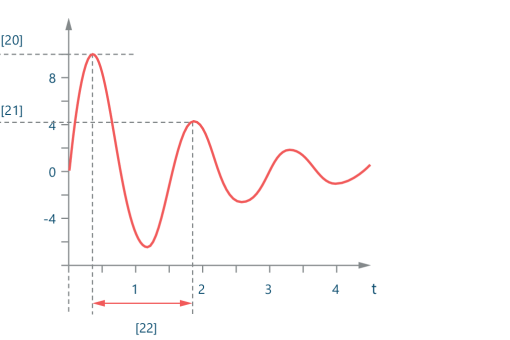

[20] | Oscillation amplitude (1st peak) |
[21] | Oscillation amplitude (2nd peak) |
[22] | Oscillation period (time between 1st and 2nd oscillation amplitude) |
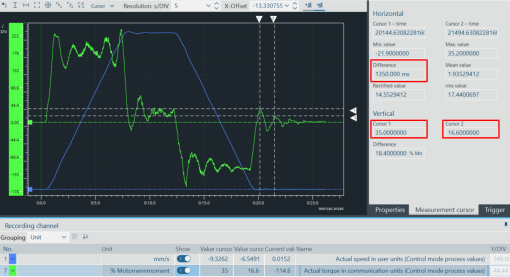
The oscillation amplitude peaks have no unit and can be specified as ratios to one another, regardless of their amplitude (e.g. 1 : 0.8). The "Sway period" can also be determined across multiple periods (e.g. measured time / number of sway periods)
- Enter the determined measured values (see figure) into the corresponding settings fields in the "Anti-sway control" configuration menu under "Support for parameter determination".
- The values "Damping ratio between tower and horizontal drive" and "Spring stiffness between tower and horizontal drive" are calculated and used directly for the anti-sway control.
