Creating a boot application
To ensure that the previous program restarts automatically after the MOVI‑C® CONTROLLER has been switched off and back on, you must create a boot application. After a change to the IEC project, the boot application must be created again; otherwise the previous program will be restarted after the MOVI‑C® CONTROLLER has been switched off and back on. The fault-free boot application is always switched to the "Run" state after the MOVI‑C® CONTROLLER has been started.
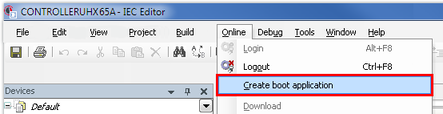
- Open the [Online] menu and click the [Create boot application] menu entry.
- The boot application is saved on the MOVI‑C® CONTROLLER so that the MOVI‑C® CONTROLLER starts with the IEC program after deactivation and activation.