With MOVILINK® DDI data
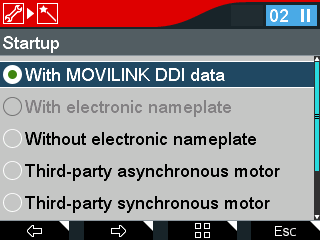
If a motor with MOVILINK® DDI is used, the automatically detected basic components such as motor, encoder and brake are displayed. All data is read out automatically.
Proceed as follows:
- Select the Startup icon in the main menu and press the <OK> key.
- Startup is being prepared: The data of the last startup is read by the inverter.
- Select the drive train and press the 2nd function key.
- Select the "MOVILINK® DDI data" option and press the 2nd function key.
- The SEW motor is preselected.
- Follow the wizard and enter the corresponding data.
- The following query appears: "Do you want to activate startup and finish motor startup? WARNING: The drive might then start automatically."
- Confirm with the <OK> key.
- The data is calculated.
- The data is transferred to the inverter.

- The motor is ready for operation.
