CBG21A as interface adapter for MOVISUITE®


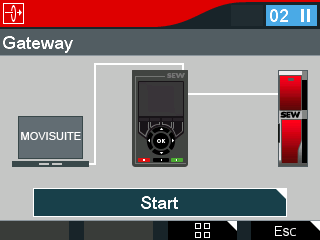
You can use the keypad to establish a connection between an inverter and MOVISUITE®. The keypad serves as a gateway for this purpose.
INFORMATION

If gateway mode is active, no other actions of the keypad can be performed.
Proceed as follows:
- The CBG21A keypad is connected to the inverter.
- The Communication window opens on the engineering PC in MOVISUITE®.
- Connect the keypad to the engineering PC using a mini USB cable. You will receive a suitable cable under part number 25643517 from SEW‑EURODRIVE.
- The "Gateway" menu is displayed on the CBG21A.
- As soon as the keypad is connected to the PC, it is displayed in MOVISUITE®.
- To establish an active connection between MOVISUITE® and the inverter, press the <OK> key on the keypad.
- You can now make settings in MOVISUITE®. For more information, refer to MOVISUITE® under More > Documents.
- Check the following settings in MOVISUITE®:
- If a keypad is already connected, it is displayed in the Connected USB adapters display field [3]. If no keypad is displayed, check the connection and then click the Update adapter button [5].
- Click the Apply button [6] to scan the connected device and transfer it to the project. The lower-level inverter is displayed in MOVISUITE® instead of the keypad.
- To disconnect the connection, click Cancel on the keypad.
- Then disconnect the USB cable.
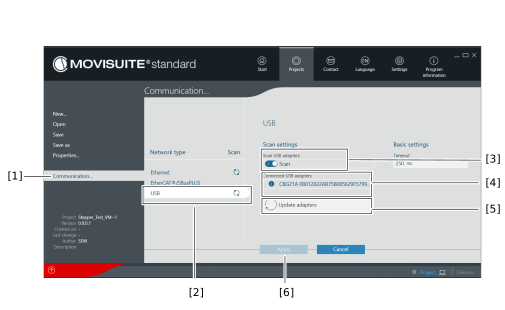
[1] | Communication tab |
[2] | Network type USB |
[3] | Scan USB adapters |
[4] | Displays the device name |
[5] | Update adapters |
[6] | Apply and scan |
