Configuring the digital inputs/digital outputs
The setting fields available for configuring the digital inputs depend on the selected option in the "Configure sensor input source freely" parameter. The parameter is set in the configuration of the software module in the [Sensor assignment] parameter group . If the "Yes" option is selected, you can freely assign the digital inputs to the sensors. If the "No" option is selected, the digital inputs are assigned to the sensors in a standardized manner.
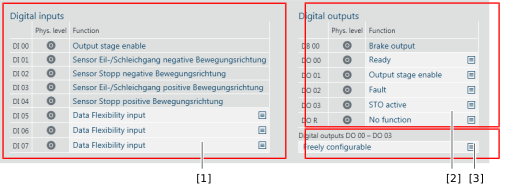
The following setting fields are available for configuring further digital inputs and digital outputs:

No. | Description |
|---|---|
[1] | List of digital inputs with drop-down lists for assigning a function and displaying the physical level. Digital input DI 00 is permanently assigned the "output stage enable" function. All inputs set to "Data Flexibility input" and that can be edited, can be freely assigned. All other inputs are already used according to the Sensor assignment. |
[2] | List of digital outputs with drop-down lists for assigning a function and displaying the physical level. Digital output DB 00 is permanently assigned the "brake output" function. |
[3] | Selection of a default assignment for the digital outputs.
|
