
| - Loosen the screws on the terminal box and remove the terminal box cover.
|

| If a connection unit with M12 plug connector is used:
- Disconnect the conductors from the connection unit.
SEW‑EURODRIVE recommends using the screwdriver 1205202 from Phoenix |
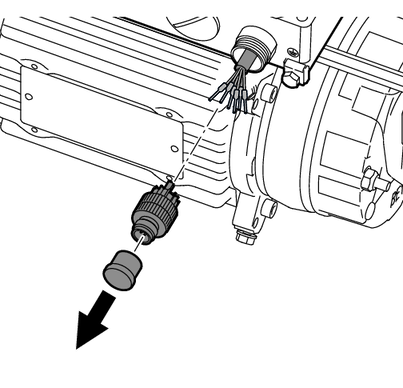
| - Unscrew the M12 plug connector.
- Disconnect the conductors of the encoder cable from the M12 plug connector.
|

| If a connection unit without M12 plug connector is used:
- Disconnect the conductors of the encoder cable from the connection unit.
SEW‑EURODRIVE recommends using the screwdriver 1205202 from Phoenix |
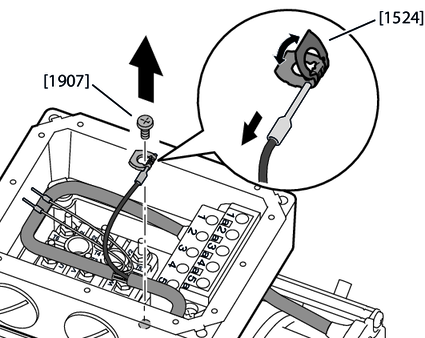
| - Loosen the screw for fastening the shielding to the terminal box.
- Bend the terminal washer open and remove the encoder cable shielding together with the conductor end sleeve.
- Dispose of the terminal washer [1524].
|

| - Loosen the screws on the fan guard and remove the fan guard.
|


| - Apply a puller to the bushing of the plastic fan and remove the plastic fan.
Notice: Applying direct force to the plastic fan can damage it! |
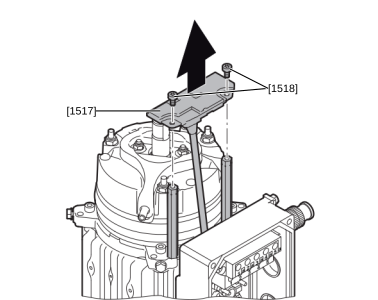
| - Loosen the screws [1518] on the encoder module cover and remove the encoder module.
- Dispose of the screws.
|
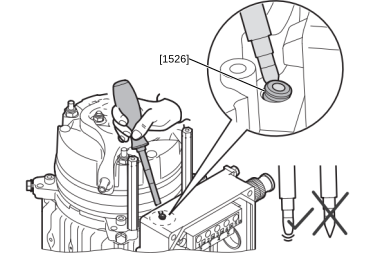
| - Remove the grommet [1526] from the cable bushing of the terminal box.
- Dispose of the grommet.
|
