Writing parameters to the inverter
The following application example shows how the fixed setpoint "speed 1" can be written.
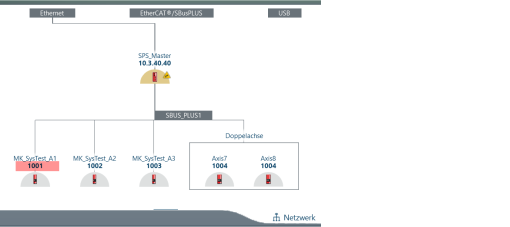
- Determine the EtherCAT® address of the inverter. You can find the EtherCAT® address, for example, in the network view in MOVISUITE®. INFORMATION: For double axes, consider whether you want to read the parameter of the left or right axis. The EtherCAT® address is identical for both.
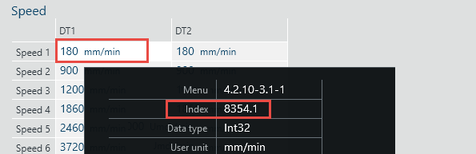
- Determine the index, subindex, and offset of the parameter to be read. To do so, move the mouse pointer over the parameter.
- The parameter properties are displayed in a tooltip.
- In this example, the fixed setpoint of the "Speed 1" parameter will be changed. The parameter has index 8354, subindex 1, and no offset.
- Send the EtherCAT® address, the desired service (write parameters), the determined values for index, subindex, and offset, and the destination (RAM, non-volatile) to the drive via the process data. For double axes, also set the bit "MDD" and for parameters from the right axis, also set the bit "MDD_Axis1_2" to "TRUE" ("for the left axis, the bit remains "FALSE").
- Start the read process by setting the "Start" bit in the control word to "TRUE".

- If the write process has been completed successfully, the "Done" bit is set to "TRUE". If an error has occurred, the "Error" bit is set to "TRUE" and the error code is output via PI 2 of the MOVI-C® CONTROLLER.
