Compiling (building) the IEC project
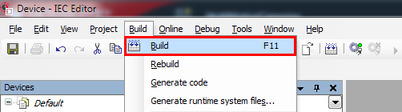
Open the [Build] menu and select [Build]. You can also start the process using the key shortcut <F11>.
The result of the build is displayed.
INFORMATION
If a fault is indicated, double-click the fault message to navigate to the fault. Eliminate the fault and compile (build) the project again.
❮
❯
MOVIKIT® RotaryKnife
Language
Deutsch
English
SEW-EURODRIVE
Home
Startup
Compiling (building) the IEC project