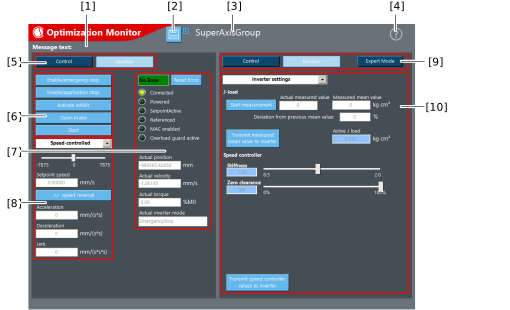
[1] | Display of information, warnings and errors |
[2] | Save settings on the memory card of the MOVI-C® CONTROLLER.
INFORMATION: The saved values can be uploaded to MOVISUITE® using the [All devices -> PC] function. Inverter settings, actual values, MAC deactivation, "Allow skew" and "Ignore skew error" are not saved. |
[3] | Name of the software module for which the optimization monitor is used |
[4] | Open help |
[5] | Select the operating mode for motion control:
- Control (control mode) – Operate the software module independently of the application program or the control of a higher-level controller.
- Monitor (monitor mode) – View current control/status information. There is no intervention in the application program or the control of the higher-level controller.
|
[6] | General control signals e.g. enable signals |
[7] | General status signals e.g. actual position or actual torque |
[8] | Travel options e.g. referencing or positioning |
[9] | Select operating mode and mode for the optimization functions:
- Control (control mode) – Change inverter settings and settings of the MultiAxis controller without preventing control of the software module by the higher-level controller or the application program.
- Monitor (monitor mode) – View the current configuration of the inverter or MultiAxisController.
- Expert mode – Show settings.
|
[10] | Optimization functions - Functions for optimizing the software module in control mode. This provides the option to adjust both the control technology of the software module and that of the inverter. |