Real-time mode
In real-time mode , continuous recording is performed with a maximum resolution of 10 ms. Press [Start] to start the recording. New recording channels can be added. Proceed as follows:
- Click the [Add new channel] button .
- A selection window opens.
- Enter the data for "Designation", "Register" and "Maximum" in the selection window.
- Designation: Name of the measured variable analog to the register designation
- Register: Internal register number of the corresponding measured variable
- Maximum: Maximum value of the scale
- Click the [Add new channel] button .
- The new recording channel is added.
Alternatively, you can select a predefined recording channel by clicking the [Load predefined template] button.
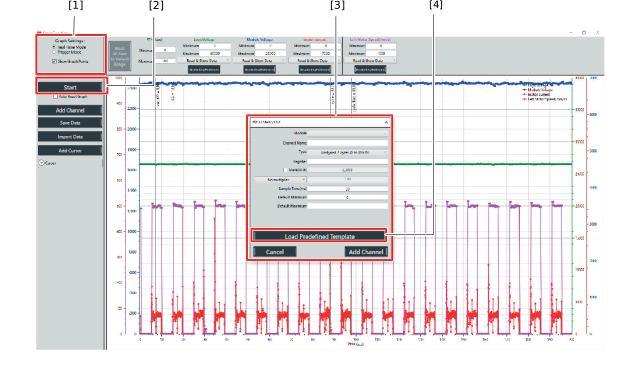

[1] | Selection of operating mode |
[2] | "Start/Stop" button |
[3] | Channel selection window |
[4] | Predefined channel |
