Large G-code files
For large G-code programs that do not fit in a default program slot, additional programs can be created in addition to the 20 standard programs. These can be configured larger than a default program slot. The number and size of these additional programs are limited by the free RAM of the MOVI-C® CONTROLLER. For more information, refer to chapters Managing additional/large SRL programs and Size and number of robot programs.
Importing a G-code file if the required program size is unknown
To determine what program size must be set in order to be able to import a given G-code file, the following procedure can be selected. If this procedure is selected, the program imported once can be retained and does not have to be imported again after setting the program size:
- Create a LargeProgram (set the constant gc_uiMaxNumberOfLargePrograms, e.g. to 1; refer to Creating additional SRL programs)
- Select the program slot 100 in the connected RobotMonitor.
- Perform the G-code import with the selected file on this slot.
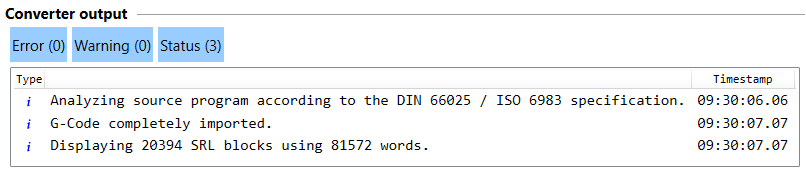
- Read the output of the G-code import to see how many SRL words are required for the program.
- Enter the read value into the constant gc_udiNumberOfSrlWordsInLargeProgram (as well as some buffer, e.g. +100; refer to Creating additional SRL programs).
- Download the IEC program to adopt the change.
- The MOVI-C® CONTROLLER is stopped. The RobotMonitor loses connection, but can remain open and the previously imported program remains in the display.
- After starting the MOVI-C® CONTROLLER, reconnect the RobotMonitor to the MOVI-C® CONTROLLER. Program 100 is still selected in the RobotMonitor. INFORMATION: The previously imported long G-code program can be retained in the display and does not have to be imported again if "No" is selected in the displayed prompt.
- After the constants (DisplaceableConstants) have been changed in the RobotBasics library, it is recommended to execute "Clear all" and "Recompile" in the IEC Editor so that the new values are adopted.