Audit
In the "Audit" tab, for example, the technical functionality of the configured containers and endpoints can be checked after startup is completed. The audit can include either individual or all containers and endpoints.
Process
When checking containers, the individual containers are enabled one after the other and the container configuration is subtracted. In parameter containers, the configured parameters are read by the selected devices and then published as an event. In scope containers, the scope recorder of the selected devices is set up and then triggered automatically by the software. The data recorded in the scope recorder is then published as an event. As soon as an event has been published successfully, the container is considered to have passed the audit. When starting the audit of all containers, all containers are first deactivated. During the audit, no container must be activated manually and no data is collected.
When checking endpoints, test data is uploaded to the corresponding endpoint. If the endpoint does not return an error message when uploading the data, the endpoint is considered to have passed the audit.
After completion of all audits, the displayed test report can be exported as a CSV file via the [Create report] button in order to subsequently open it with Microsoft Excel or other spreadsheet programs, for example.
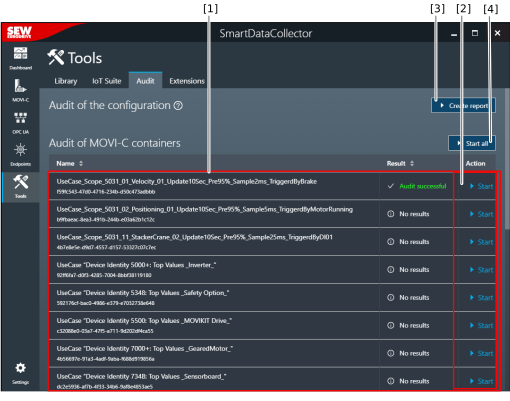

[1] | Containers and endpoints with name and result |
[2] | Start checking an individual endpoint |
[3] | Export the test report as a CSV file |
[4] | Start a sequential check of all containers and endpoints |
