Connecting the ESS energy storage cabinet using an automation script
A standard ESS energy storage cabinet can be connected using an automation script. It is a prerequisite for an IEC project to have been created via the automatic code generation of MOVISUITE® and be unchanged.
The automation script executes the following actions:
- Checking the required device descriptions and, if necessary, installing the ESI files for missing device descriptions.
- Importing the bus couplers used and the corresponding modules.
- Generating an instance of the corresponding IOConnector_ESS module in the User_PRG.
- Generating a call of the LinkModules method in the User_PRG.Init.
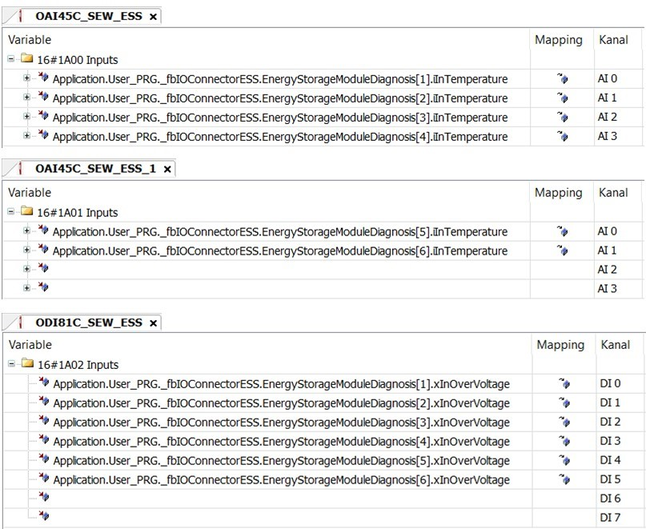
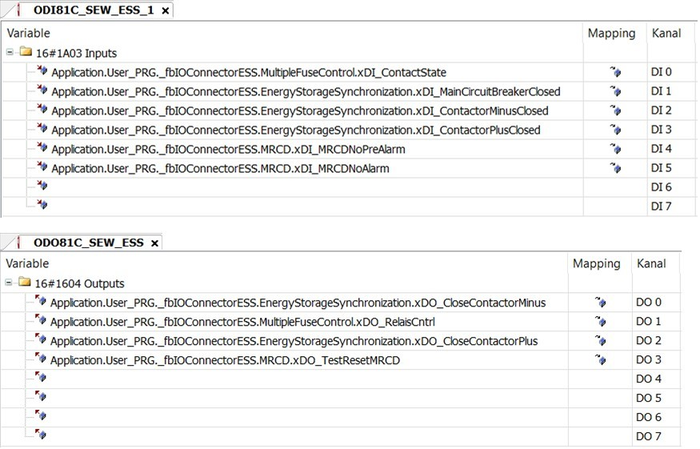
- Linking the corresponding variables with the digital and analog inputs and outputs of the bus coupler.
Proceed as follows to connect a standard ESS energy storage cabinet using the automation script:
- An IEC project is opened in the IEC Editor that has been created via the automatic code generation of MOVISUITE® and has not been changed.
- In the IEC Editor, open the menu [Tools] > [Scripting] > [Scripts] > [E] and select the menu entry [ESS_Import.py].
- A dialog window is displayed.
- Select the configuration source.
- If the "Config from Type Description" option is selected, the configuration is carried out by entering the ESS type designation. The ESS type designation can be found in the purchase order documents or on the nameplate of the storage cabinet. The type designation contains all relevant information.
- If the "Manual Configuration" option is selected, the configuration is carried out manually after confirming with [OK] by querying the bus coupler type, the type of ESS cabinet (single or double cabinet) and the number of storage modules. If several MDP power supply modules and/or MDE DC/DC converter modules are present in the IEC project, it is also necessary to select which device should be used for linking with the ESS module. If only one device is included in the IEC project, this is selected automatically.
- After the configuration has been completed, the automation script performs the connection of the ESS energy storage cabinet. Once the connection has been completed successfully, the "ESS import successful" message is displayed in the message window.
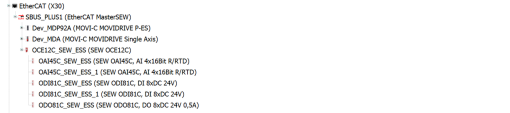
The configured bus coupler (here: OCE12C, 6 modules) is displayed in the device tree under the EtherCAT® master:

All necessary variables are linked with the digital and analog inputs and outputs of the bus coupler: