With MOVIKIT® StackerCrane MultiAxisController
- A suitable MOVIKIT® software module of the "Motion" category (e.g. MultiMotion, Positioning, Gearing) has been inserted and configured for all axes you want to couple with the PES software module.
- A software node with the MOVIKIT® StackerCrane MultiAxisController is located at a higher level than the axes.
- A PES software module is inserted and configured on the power supply module.
- Open the configuration of the lower-level MOVIKIT® MultiMotion axes.
- In the "Basic settings" configuration menu, activate the "MOVIKIT® MultiAxisController" in the "Higher-level MOVIKIT®" section.
- In the "Basic settings" configuration menu, activate the "Additional process values of the inverter" option in the "Functions used" section.
- Open the configuration of the higher-level MOVIKIT® StackerCrane MultiAxisController.
- In the "Basic settings" configuration menu, activate the "Energy coupling" function in the "Functions used" area.
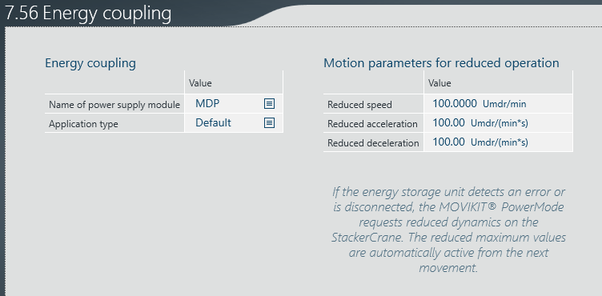
- Open the "Energy coupling" configuration menu.
- Select the matching power supply module.
- The software modules are coupled with each other and exchange information.