SEW axes
To measure the active power consumption of SEW axes using the power measurement function (PowerMonitor), they must first be connected to the software module of the PES unit via "Energy coupling". For further information, refer to chapter Energy coupling. Coupling is possible with all axes that are operated via MOVIKIT® software modules of the "Motion" category.
After successful coupling, the following settings can be made in the axis to also transfer the active power to the MOVI-C® CONTROLLER. The current active power of the axes is not transferred to the MOVI-C® CONTROLLER by default so it must first be set in the process data profile of the axis. Proceed as follows:
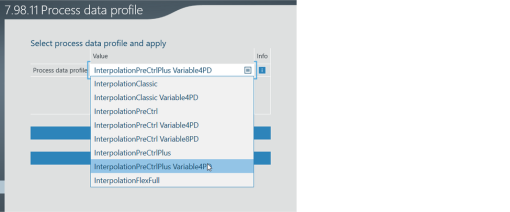
- In the "Process data profile" configuration menu of the MOVIKIT® software module of the "Motion" category ("Advanced settings"), select a process data profile for the axis that allows optional or variable process data (in the example: "InterpolationPreCtrlPlus Variable4PD").
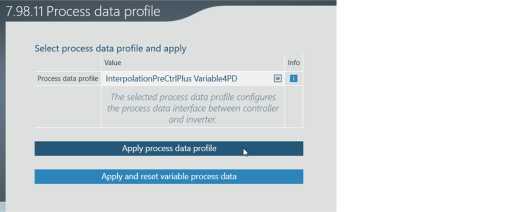
- Click [Apply process data profile] and then [Apply and reset variable process data].
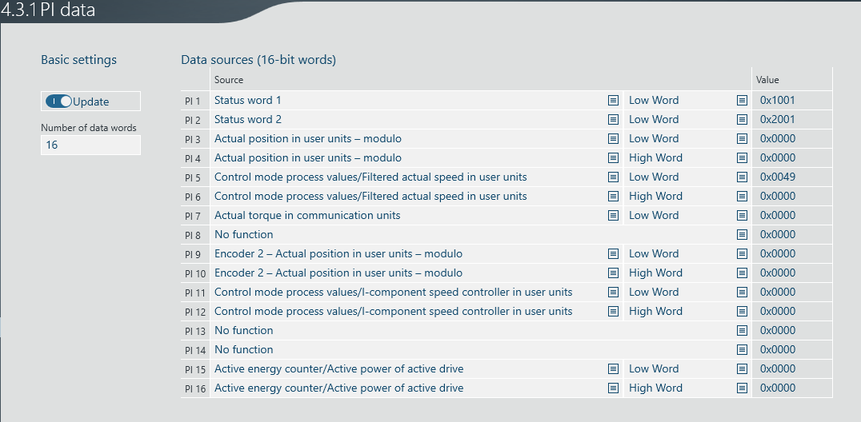
- Switch to the "Process input data" configuration menu of the MOVIKIT® software module of the "Motion" category ("Actual values" > "PI data").
- The overview shows free process data words (in the example: 4 free process data words).
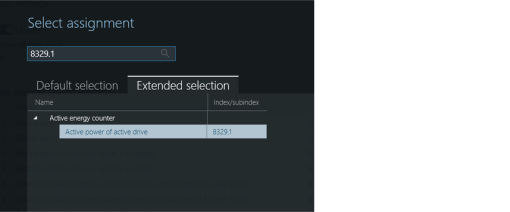
- Assign 2 consecutive process data words from the 4 process data words to parameter 8329.1 "Active power of active drive".
- Assign the first process data word as "low word" and the second process data word as "high word" (in the example: Process data words 15 and 16).

- The MOVIKIT® software modules now automatically read out the active power and provide it in the "PowerMonitor".
- Proceed in this way for all axes from which you want to read out the active power.
INFORMATION: If the axis is positioned below a MOVIKIT® StackerCrane MultiAxisController, then "energy coupling" is not activated at the axis but in the configuration of the MultiAxisController. However, the process data words must nevertheless be configured on the axes. The MultiAxisController combines the performance data of the lower-level axes and passes them on. However, it passes them on only if the axes provide this data.
