Configuring a MOVISUITE® project
The figure below shows, by way of example, the project configured in MOVISUITE® on which the application example explained here is based. To implement the top drive, the software modules MOVIKIT® StackerCrane, MOVIKIT® StackerCrane MultiAxisController and MOVIKIT® StackerCrane MultiMotion are used.
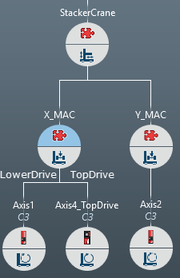

Explanation:
The "X_MAC" axis maps the X direction of the application, in which the lower drive ("LowerDrive") and top drive ("TopDrive") are implemented by means of a MOVIKIT® MultiAxisController. If multiple drives are used for the lower drive, they have to be cascaded by means of the MOVIKIT® MultiAxisController Torque and the MOVIKIT® MultiAxisController add-on Cascading. However, the cascading option for the top drive is still in preparation. To implement a cascade, contact SEW‑EURODRIVE Service.
