Devices
The tabs of the various devices display all containers created, their assigned devices, statistical values, and error messages. The read out parameter values or scope recordings can be viewed subordinate to the devices. The view of the devices can be filtered by parameter or scope containers using the drop-down list in the top right corner.
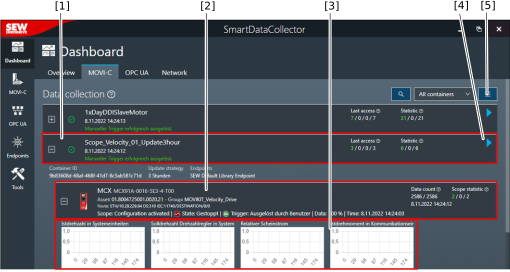

[1] | Container created for a device type |
[2] | Device assigned to the container |
[3] | Data acquisition configured for the device (in the example: scope recording) |
[4] | Button for manually triggering a data acquisition |
[5] | Menu with advanced functions (e.g. "Display deviation of cycle time") |
The following data must be specified for the containers (from left to right):
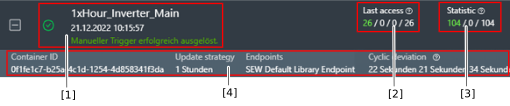
[1] General information |
Status of data entry (in the example: green check mark = receive data) |
Name of the container |
Time of the last data entry |
Status message of the container |
[2] Last access – Statistical values for the last read access |
Number of devices that have been read successfully |
Number of devices that have not been read completely |
Number of devices that have been offline or not available |
Number of devices assigned to the container |
[3] Statistics – Statistical values since the last start of the container |
Number of devices that have been read successfully or partially successfully |
Number of devices that have been offline or not available |
Number of devices assigned to the container |
[4] After opening the container, the following information is displayed: |
ID of the container |
Update strategy defined for the container |
Endpoints assigned to the container |
Deviation of the cycle time from the expected cycle time with the following key figures:
|
The following data must be specified (from left to right) for devices for which parameter acquisition is configured:

[1] General information |
Unique PROFINET name or device signature and device identification |
Unique serial number of the device (asset ID) |
Group to which the device is assigned |
Network route for communication with the device |
[2] Last access – Statistical values for the last read access |
Number of parameters that have been read successfully |
Number of parameters that could not be read |
Number of parameters configured for data extraction from the device |
The following data must be specified (from left to right) for devices for which parameter acquisition is configured:

[1] General information |
Unique PROFINET name or device signature and device identification |
Unique serial number of the device (asset ID) |
Group to which the device is assigned |
Network route for communication with the device |
Status of the scope recording (among others state, trigger, data) |
[2] Data endpoints – Data counter for data acquisition |
Number of data points read |
Configured maximum number of data points |
Time of the last data entry |
[3] Scope statistics – Statistics of the last data entry |
Number of parameters that have been read successfully |
Number of parameters that could not be read. |
Total number of parameters configured in the data container |
