Processing jerk specifications
When processing certain jerk specifications, the system may behave in an unexpected way. The examples described below illustrate potential scenarios:
NOTICE

Unexpected system behavior resulting from reversing the drive
Death, severe injuries, damage to property
- Do not change the specified jerk, instead treat it like a variable that you configure once.
- Only change the specified jerk, if the acceleration currently effective is "0".
Example 1
The user would like to stop rapidly in a particular situation. To achieve this, he specifies a large jerk for the lrJerk input variable and removes the xStart start signal. As a result, the deceleration used to reduce the speed is built up with the large specified jerk.
Even before the speed has reached "0", the user decides to continue the movement anyway. To achieve this, he specifies a smaller jerk for the lrJerk input variable and reactivates the xStart start signal. As a result, the deceleration reduces with the small jerk now set such that even after the start signal is activated, negative acceleration is effective for a certain period. This means that the speed may be negative, i.e. the drive reverses.
The diagram below illustrates this scenario.
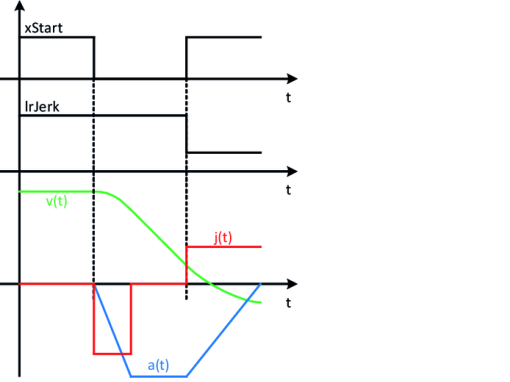

v(t) | Speed |
a(t) | Acceleration |
j(t) | Jerk |
Example 2
The user has initiated a movement at a certain speed in a certain direction. He would now like to rapidly reduce this speed in a particular situation. To achieve this, he specifies a new lower speed for the lrVelocity input variable and a large jerk via lrJerk. As a result, the deceleration used to reduce the speed is built up with the large specified jerk.
Even before the speed has reached the specified value, the user decides to increase the speed again. To achieve this, he specifies a higher speed for the lrVelocity input variable but a smaller jerk via lrJerk. As a result, the deceleration reduces with the small jerk now set such that negative acceleration is effective for a certain period. This means that the speed may be negative, i.e. the drive reverses.
The diagram below illustrates this scenario.
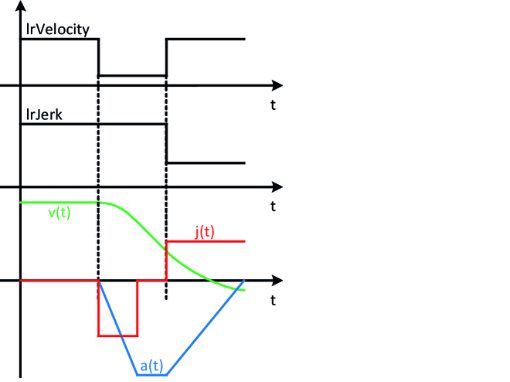
v(t) | Speed |
a(t) | Acceleration |
j(t) | Jerk |
Explanation
A scenario such as this may always arise when a deceleration achieved with a large jerk is to change to an acceleration with a small jerk. The profile generation is brought into a state displaying the following features:
- Movement takes place in a certain direction at a certain speed.
- The speed counteracts deceleration.
- The deceleration is to be changed into an acceleration under consideration of the specified jerk.
- The deceleration acting against the speed is reduced with the specified jerk.
- For as long as this deceleration has not reached "0", the speed continues to counteract it which may ultimately result in the speed changing from positive to negative and the drive therefore potentially reversing unexpectedly.
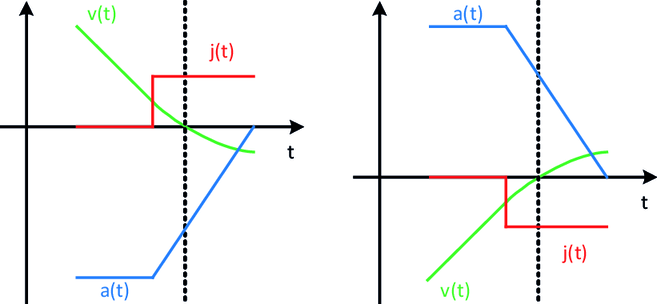
The diagrams below illustrate these scenarios. A distinction can be made between 2 scenarios:
- The speed is positive and the acceleration is negative (diagram on left) The speed is negative and the acceleration is positive (diagram on right)
In both scenarios, the movement reserves at the time indicated by the vertical line.
INFORMATION

The user is responsible for ensuring that the control configured for profile generation does not result in unexpected behavior.
Unexpected reversing can typically be avoided through the following actions:
- The specified jerk is not changed, but instead treated like a variable which is configured once.
- The specified jerk is only changed if the acceleration currently effective is "0".
