Generating an IEC project
Carry out the following steps to create an IEC project using automatic code generation based on the configuration settings in MOVISUITE®:
- Configuration of the MOVISUITE® project has been completed.
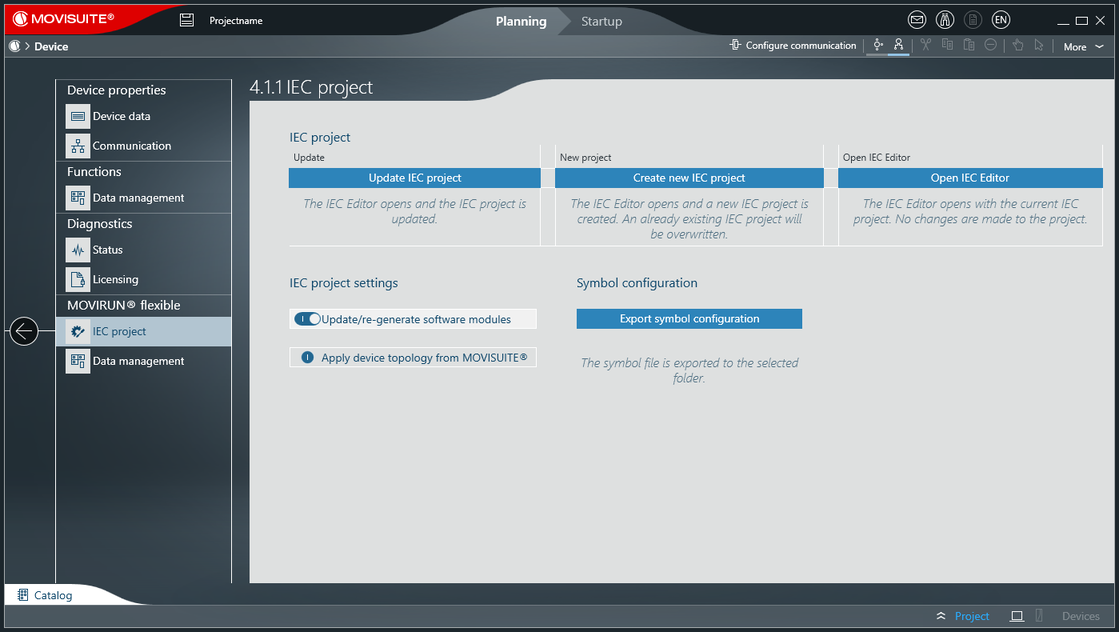
- In the function view of MOVISUITE®, click the software module section of the MOVI-C® CONTROLLER.
- The "IEC project" menu opens.
- Click [Create new IEC project].
- The IEC Editor opens and a new IEC project is created.

INFORMATION

If changes are made to the project structure, to inverter data sets, or to a software module configuration after the IEC project is generated for the first time, a message icon is displayed on the MOVI‑C® CONTROLLER node. Click the message icon for more information on the change, and to update the IEC project.
Additional information
