Configuring the device in the TIA Portal
INFORMATION

The configuration is shown as an example using the TIA Portal engineering tool.
Proceed as follows:
- The corresponding GSDML file of the controller used has been installed.
- Configure the controller. For a detailed description of how to configure the controller, refer to the "Controllers of the MOVI-C® Modular Automation System, Startup with PROFINET/PROFIsafe" manual.
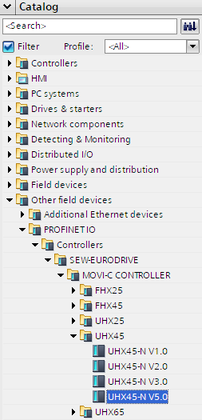
- In the hardware catalog of the TIA Portal, select the appropriate device description of the controller you use (e.g. UHX45) under [Other field devices] > [PROFINET IO] > [Controllers] > [SEW-EURODRIVE] > [MOVI-C® CONTROLLER].
- Select the device whose version ID matches the firmware version of the fieldbus interface of the controller.
- Set the following parameters in the "Properties" area:
- IP address, subnet mask, and gateway address
- PROFINET device name of the controller
- Set the following parameters in the "IO cycle" area:
- Refresh time (recommended: 2 ms)
- Number of IO cycles with faulty IO data (recommended: 30)
- If required, set the parameters in the "Shared Device" and "MRT" areas (media redundancy).
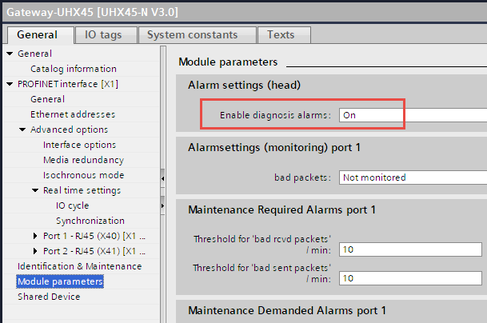
- Activate the diagnostic alarms in the "Module parameters" area.