Configuring scope
- MOVITOOLS® MotionStudio is opened and a project is created.
- Configure the communication ports in your project and scan the network.
- The devices detected in the network are added to your project.
- Open the context menu of the inverter and, in the "Diagnostics" submenu, click "Scope (Offline)".
- The "Scope" window opens.
- In the menu bar of the window, select "Recorder settings..." from the "Edit" menu.
- The "Scope settings" window appears.
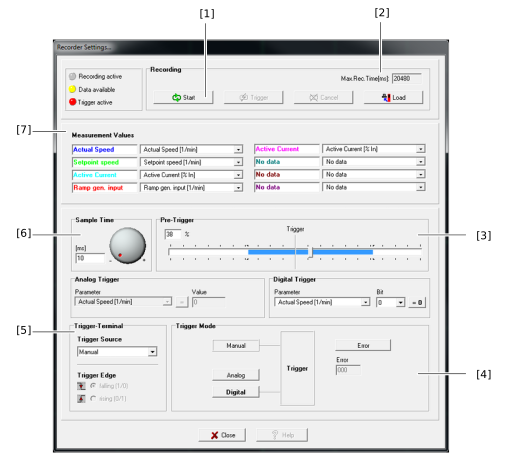

No. | Designation | Use |
|---|---|---|
[1] | Start recording | Apply configuration and start scope recording |
[2] | Maximum runtime | Time resulting from the size of the scope memory on a device and the set sampling cycle |
[3] | Pre-trigger | Pre- and post-trigger time |
[4] | Trigger mode | Select between manual, analog and digital |
[5] | Trigger terminal | Select a digital input or output of the device |
[6] | Sampling cycle in ms | Time interval in which the measured values are written into the scope memory. |
[7] | Measured value channel assignment | Set parameters to be recorded |
- Configure the scope recording using the available setting fields.
- Test the configuration by manually starting a recording using the buttons in the "Recording" area ([Start] scope recording, if required [Trigger] manually and [Load] scope template on the device).
- In the scope settings window, click the [Close] button.
