Licensing
Purchasing one of the following licenses is required for operating the software:
Software license | Type designation |
|---|---|
DriveRadar DataCollector B unlimited 10axes | SDR0001-000 |
DriveRadar DataCollector B unlimited 25axes | SDR0002-000 |
DriveRadar DataCollector B unlimited 50axes | SDR0003-000 |
DriveRadar DataCollector B unlimited 100axes | SDR0010-000 |
DriveRadar DataCollector B unlimited 10axes update | SDR0004-000 |
DriveRadar DataCollector B unlimited 25axes update | SDR0005-000 |
DriveRadar DataCollector B unlimited 50axes update | SDR0006-000 |
DriveRadar DataCollector B unlimited 100axes update | SDR0011-000 |
DriveRadar DataCollector B yearly 10axes | SDR0007-000 |
DriveRadar DataCollector B yearly 25axes | SDR0008-000 |
DriveRadar DataCollector B yearly 50axes | SDR0009-000 |
DriveRadar DataCollector B yearly 100axes | SDR0012-000 |
After purchasing a license, you will receive a license key. Enter the license key in the "License check" dialog when you start the software for the first time after installation.
INFORMATION

Go to [Help] > [About] to view the current state of the license, meaning the maximum number of supported SEW devices and how long the license is valid.
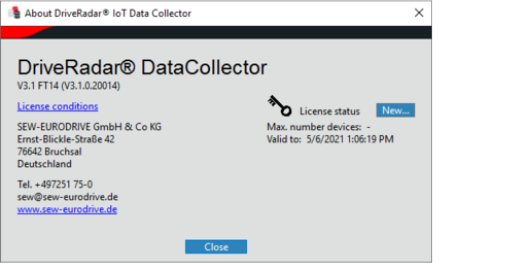

If you want to change or renew the license, go to the start screen of the software. There, choose [Help] > [About] and click the [New] button. Enter the license key in the dialog that opens.
