Modifying an existing machine
Example 1
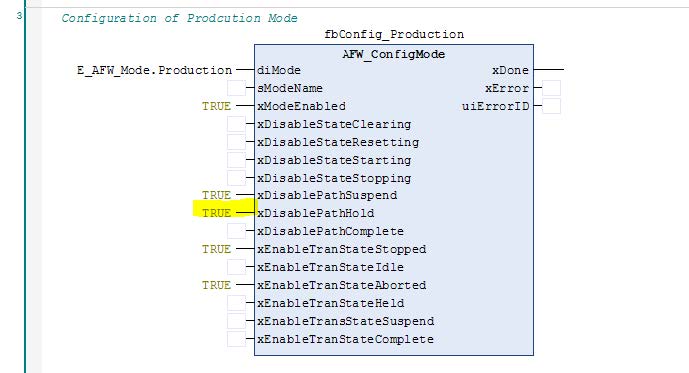
In "Production" mode, expand the machine by the states "Holding" and "Held" without adding further actions to these states.
Solution
"Init" is found under PRG_AFW. This action initializes the modes. If the "PathHold" input is no longer deactivated in fbConfig_Production, this branch of the step sequence can be used later. This means the xDisablePathHold input must be set to FALSE. Other states can also be switched on or off in the same way.

Example 2
Perform a mode change (ProductionMode → ManualMode) when "Complete" state is active
Solution
In this example, the configuration is modified in "Init". At least two of the modes must be changed. A mode change is possible if both modes permit this mode change in their respective state. In this example, the changes are made in all three modes. In the "fbConfig_Production", "fbConfigMaintenance", and "fbConfig_Manual" modes, the "xEnableTransStateComplete" input is set to TRUE.
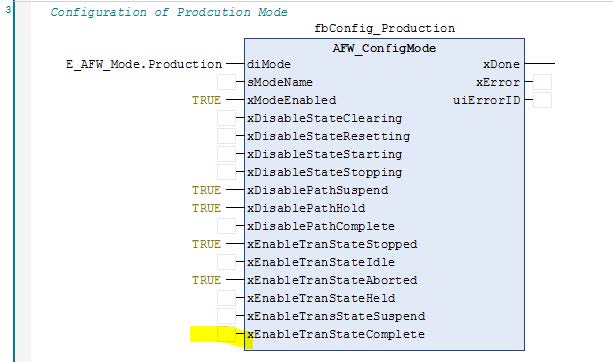
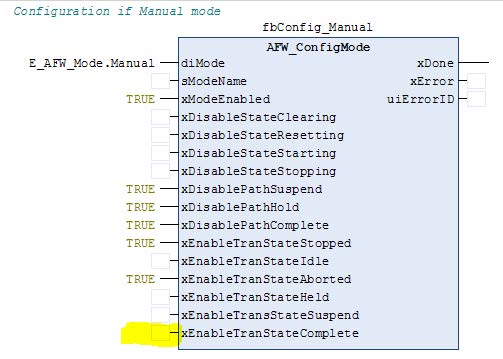
Additional configurations can be made in "Init". However, the most important configurations are shown in example 1 and example 2. The program is configured and a decision is made as to which modes and states are to be used and in which states a transition between the modes is safe. The configuration in "Init" defines a large part of the later course. It is advisable to consider what the machine's workflow should look like at this stage of the program. Modifications are possible at any time. States and modes can be added as shown in the examples.
Example 3
Modify the conveyor belt in such a way that an xCyclicStop is performed when it is in "Production" mode and in the "Execute" state. The conveyor belt stops at position 500 mm and then signals "StateComplete" (SC).
Solution
Modifications in the "Completing" state are made in the "fbConveyer.Production" function block. If the start bit is set to FALSE, the conveyor belt moves to the position defined by "lrStopPosition".
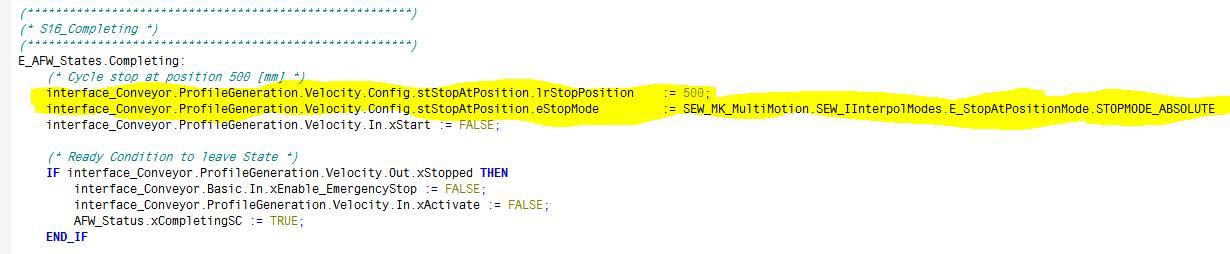
This example shows that each part of the program can be modified. It was already apparent during configuration of the program how states and modes can be added or changed.
The basic structure of the program must not be changed but the actions within the program can be extended and modified by the user. In the case of the conveyor belt, the "FB_AppType2" is used. In later examples, the configuration is illustrated with "FB_AppType1".
