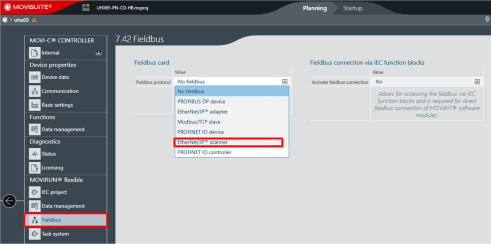
Selecting the fieldbus option "EtherNet/IP™ scanner"
Open the "Fieldbus protocol" drop-down list in the "Fieldbus" menu. Select the entry "EtherNet/IP™ scanner".
Please note that the "Activate fieldbus connection" choice box must be set to "No".
❮
❯
MOVI-C® CONTROLLER progressive UHX65A-M
Language
Deutsch
English
Français
Español
Brasileiro
汉语
SEW-EURODRIVE
Home
Startup with EtherNet/IP™
Setting up the EtherNet/IP scanner
Adding the EtherNet/IP™ scanner via MOVISUITE® configuration
Selecting the fieldbus option "EtherNet/IP™ scanner"