Starting MOVI-C® CONTROLLER: booting the network
You can now start the MOVI‑C® CONTROLLER:
- The master and slaves have been configured.
- The project planning in the IEC project matches the real system.
- To compile the IEC project into machine code, press the <F11> key in the IEC Editor.
- To log in, press the keys <Alt> + <M>.
- To start the MOVI‑C® CONTROLLER, press the <F5> key.
Instead of pressing the keys, you can click the respective symbols in the menu bar of the IEC Editor.
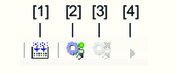

[1] | Compile IEC project in machine code |
[2] | Log in |
[3] | Log off |
[4] | Starting MOVI‑C® CONTROLLER |
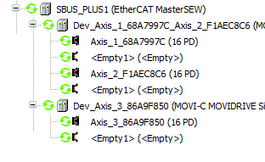
When no faults are present in the system, the ESM changes to "operational" ESM state once the network has booted. The devices in the device tree are marked by a green symbol.