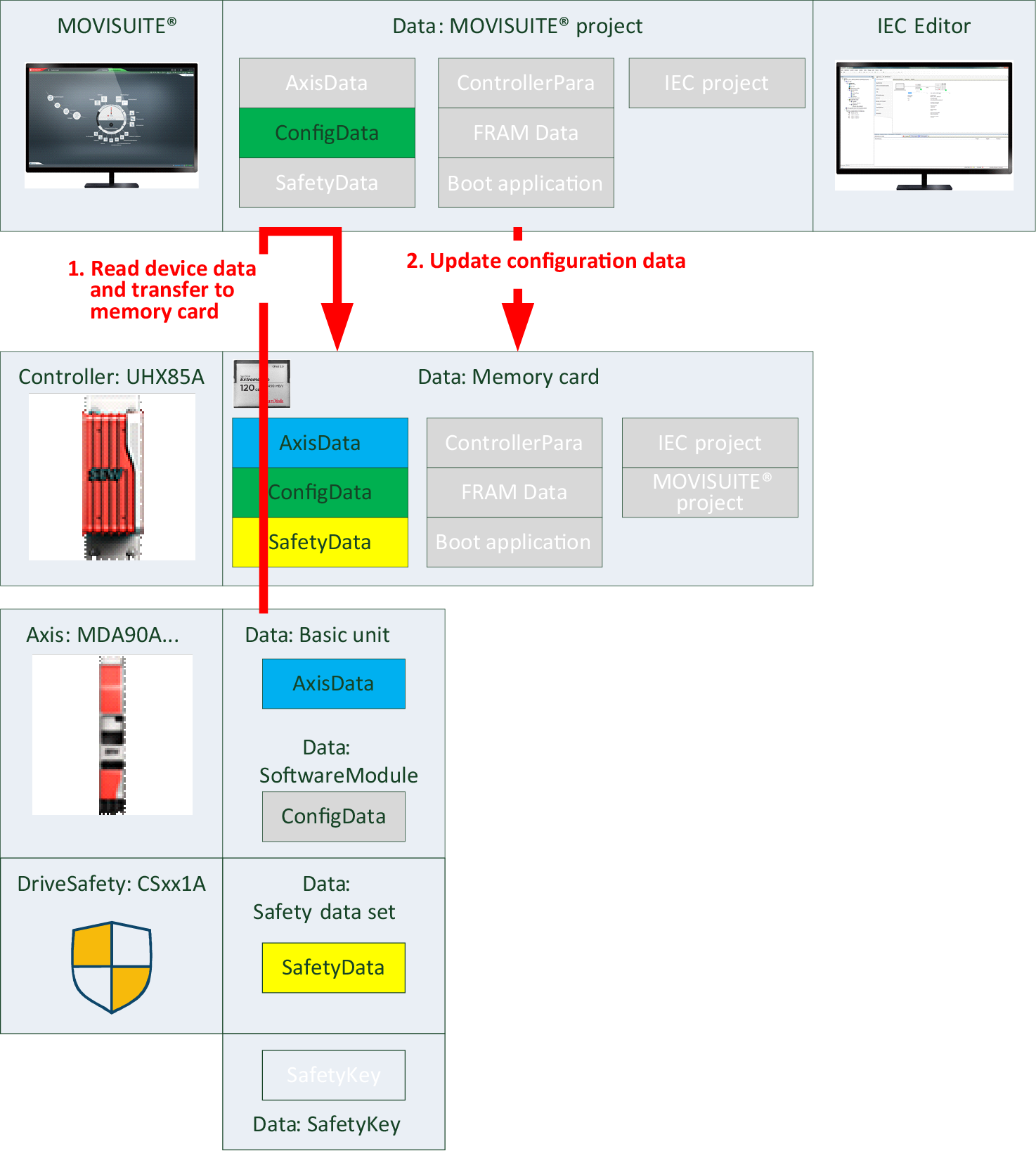
"Update configuration data" function
The "Update configuration data" function is available in MOVISUITE® for devices in the context menu of the device node in the function view, and in the "More" menu.
Bear in mind the following information when using this function:
- The configuration data of the software modules of the lower-level axes are transferred to the memory card of the MOVI‑C® CONTROLLER.
- The parameter sets of the axes for automatic restore of inverter data sets (including the parameter set of the safety option) are transferred to the memory card of the MOVI‑C® CONTROLLER.
- If the data sets of a connected device are not identical with the data sets of the MOVISUITE® project, a notification symbol appears at the axis in MOVISUITE®. You can enable and disable the notification symbols in the MOVISUITE® settings in the "Advanced..." submenu using the sliders for "Activate device status test" and "Activate consistency check".
- To use the "Update configuration data" function, the axis data sets must be synchronized.