Logging in and downloading the IEC project
- There are no errors in the "SEW IEC project generation" category, the library manager, and the precompilation in the IEC project. If errors are present, they are displayed in the message window and must be corrected for logging in and downloading.
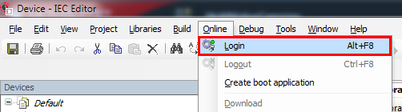
- Open the [Online] menu and click [Login]. You can also log in with the key shortcut <Alt> + <F8>.
- The IEC project is compiled.
- Logging in to the MOVI-C® CONTROLLER is performed.
- A dialog box appears asking whether the program is to be downloaded.
- In the dialog window, click [Yes].