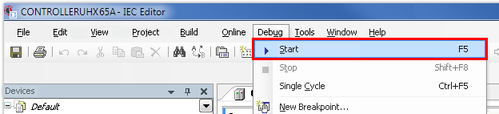
Starting the IEC program
The IEC Editor is logged in and the IEC project has been downloaded to the
MOVI-C
®
CONTROLLER
.
Open the [Debug] menu and select [Start]. You can also start the process using the key shortcut <F5>.
The IEC program on the
MOVI‑C
®
CONTROLLER
starts.
❮
❯
MOVIKIT® PowerMode, MOVIKIT® ParallelMode
Language
Deutsch
English
SEW-EURODRIVE
Home
Startup
MOVIRUN® flexible
Starting the IEC program