Key assignment DBG
The following figure shows the key assignment of the DBG keypad:
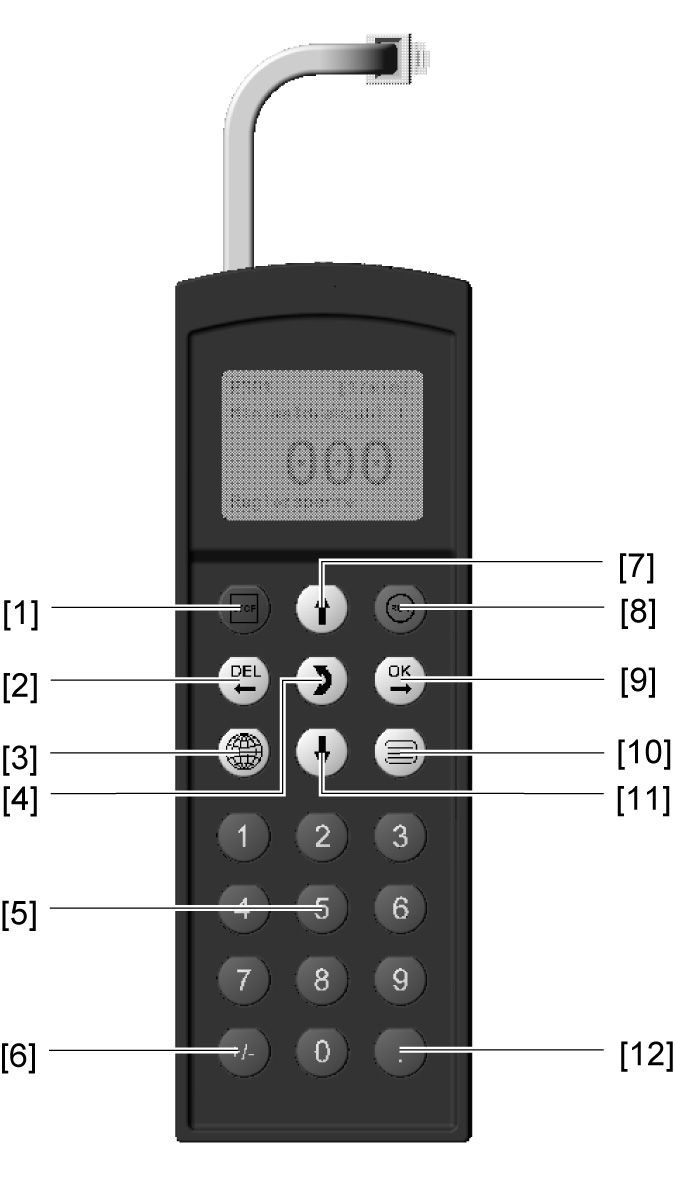

[1] | Key |
| Stop |
[2] | Key |
| Delete previous entry |
[3] | Key |
| Select the required language |
[4] | Key |
| Change the menu |
[5] | Key | <0> – <9> | Digits 0 – 9 |
[6] | Key |
| Changes signs |
[7] | Key |
| Up arrow, moves up to the next menu item |
[8] | Key |
| Start |
[9] | Key |
| OK, confirms the entry |
[10] | Key |
| Calls up the context menu |
[11] | Key |
| Down arrow, moves down to the next menu item |
[12] | Key |
| Decimal point |


