Configuring the software module
The startup wizard is used to configure the selected MOVIKIT®. You can later make changes in the parameter tree of the software module by performing the following steps:
- In MOVISUITE®, double-click on MOVIKIT® Positioning Drive, Velocity Drive.
- The configuration of the software module is displayed.
- Configure the software module using the respective setting fields.
- Click button [1] after having completed the configuration.
- The project overview is displayed.
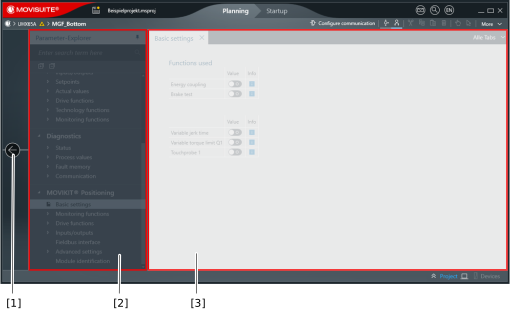

[1] | Button for returning to the project overview |
[2] | Parameter tree of the software module configuration (section MOVIKIT®) |
[3] | Parameter display with setting fields |
INFORMATION