Handling the workpiece
Command for loading, unloading, and configuring a workpiece. The settings are transferred to the physics simulation. All specified values are interpreted in SI units.
"New Block" value: "SET_WORKPIECE"
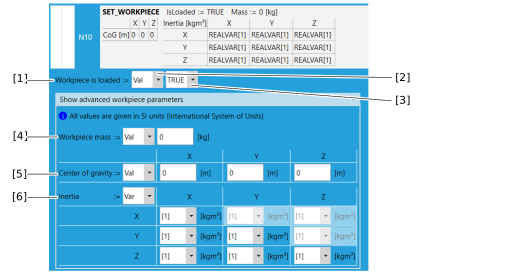

[1] | Select whether the workpiece is loaded (TRUE) or unloaded (FALSE). The loaded workpiece is taken into account in the physics simulation. |
[2] | Type of the assigned value ("Var" = variables, "Val" = constant value, Keep = no assignment, the previous value of the property remains) |
[3] | Value that is assigned. (Var = choice box with the index of the available SRL variables, Val = edit box for absolute values with the type floating-point number or Boolean value TRUE / FALSE) |
[4] | Workpiece mass The values configured in MOVISUITE® are overwritten. |
[5] | Workpiece center of gravity The KEEP/VAL/VAR selection applies to the entire matrix. |
[6] | Workpiece inertia properties The KEEP/VAL/VAR selection applies to the entire matrix. |
