Use of variables
Variables make it possible to store values and to use these values as operands for mathematical and logical expressions. Variables can be used for calculating a variable position, an offset, or as a value for address letters, for example, as follows in any G-code dialect:
WaitTime = Real1 + 500
G1 X=100+Offset Y=100+Offset_Y F=Fast
G1 X=Position_X Y=Position_Y
G4 Time=WaitTime
TargetReached = TRUE
If values, variables or expressions from 2 operands are assigned to other variables in the G-code, the specification of an equal sign is mandatory:
Real1 = 100, Real1 = Real2, Bool1 = True, Bool1 = Bool2,
Pose1.Z = 10, Pose.Z = Real1, X=Real1+100.
For address letters, specifying an equal sign when assigning a constant numerical value is optional:
X100is equivalent toX=100F1000is equivalent toF=1000
In G-code, the same data types (Bool, Real and Pose) can be used as in SRL programming. In SRL programming, variables are defined and used by their index. In G-code, defining and using is done by their names. In order to convert G-code to SRL commands and vice versa, it is necessary to define which G-code variable uses which index and type of SRL variable. The user must define the assignment of G-code to the SRL variable in the Variables tab prior to import or export. In this mapping table, the name of the G-code variable is mapped to the configured index of the SRL variable during import. Conversely, during the export of G-code, the variable index used in the SRL program is assigned to the G-code name. Variables cannot be imported or exported without a defined assignment in the assignment table. Unknown strings or undefined variables lead to syntax errors. G-code variables are globally valid for any program by means of this list, and can be used in any G-code program (as well as in other SRL programs and in CallFunctions by the index of the SRL variables).
With an existing G-code program, all variables used in the G-code must be entered in the G-code variable assignment table, and then the definitions must be transferred to the SRL variable list ([G-code var list > SRL var list] button). This allows the identifiers to be stored with the SRL program. The definitions in the G-code configuration file can be saved to the hard drive via the General tab.
With an existing SRL program, all variables used in the SRL program must be assigned identifiers and then the SRL variables must be transferred to the G-code variable list ([SRL var list > G-code var list] button). This allows the definitions of the variables used in the G-code to be stored in the G-code configuration file and used during an import.
If different variable definitions are required for several G-code programs, this can be specified in different G-code configurations. These configurations can be saved and reused during the next import or export.
INFORMATION

Variables or expressions in the G-code program (as in the SRL program) are not synchronous with the movement. When the program lead-in "P" (program pointer) reaches the expression, it is processed. In the SRL program (e.g. after import) expressions can be synchronized by the WAIT_MOTION_DONE InLastSegment command. Here, the lead-in is stopped until the beginning of the last path segment. Since there is no command in the G-code equivalent to WAIT_MOTION_DONE, the lead-in must be stopped applicatively by programming an IEC call function (M-function). There, the variables Interface_MyRobot.Prg.OUT.lrRemainingDistance and Interface_MyRobot.Prg.OUT.lrRemainingTime can be used by the user code to determine when the lead-in is continued.
Use of pose variables in G-code
Pose variables have 6 dimensions of the "Real" data type. Access to a dimension is achieved via square brackets following the variable identifier, e.g. Pose_Var_1[ 1..6 ] or via the letters X, Y, Z, A, B, C (or according to the user-specific configuration of these address letters). Not every G-code command that expects a numerical value allows the use of a pose variable instead of a real variable. If the pose data type is not allowed for the G-code command used, corresponding information is displayed in the message window of the G-code import dialog. The following example shows the use of pose variables:
Pose_Var_1.Z = Pose_Var_1.Z + 100
Pose_Var_1.Z = Real_Var_1 +100
Pose_Var_1.Z = 100
Vector operations with pose variables (e.g. vector addition Pose_Target = Pose_1 + Pose_2) are not possible. For example, if vector addition is required, addition must be performed on each dimension of the pose variable:
Pose_Target.X = Pose_1.X + Pose_2.X
Pose_Target.Y = Pose_1.Y + Pose_2.Y
Pose_Target.Z = Pose_1.Z + Pose_2.Z
…
Use of real variables in G-code
The operators +, -, *, / can be used for operations with only real or pose variables. If the dimension is specified for pose variables, both data types can be used as operands:
Real_Target = Real_1 + Real_2
Real_Target = Real_1 / Real_2
Pose_Target.Z = Real_1 + Pose_Target.Z
Real_Target = Pose_1.X + Pose_2.Y
Implementation of real and pose expressions in the SRL program:
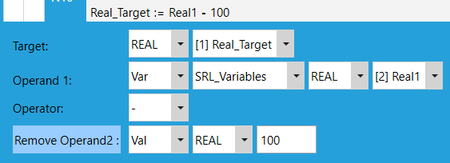
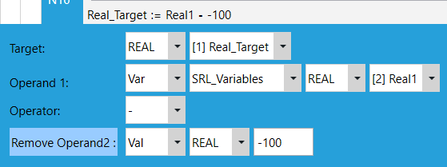
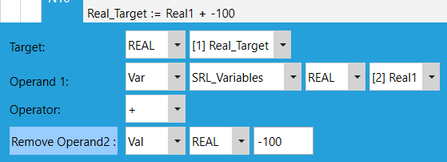
Expressions with numerical operations as well as real and pose variables in the G-code are converted to a CALC_REALVAR block. Signs are allowed for constant numbers, but not for variables. If a constant value should be explicitly displayed as negative in the SRL program, the operator and the sign must be placed in front of the number.
The expression Real_Target = Real_1 -100 is implemented as an SRL command as follows:

The expression Real_Target = Real_1 - -100 is implemented as an SRL command as follows:
The expression Real_Target = Real_1 + -100 is implemented as an SRL command as follows:
Use of Boolean variables in G-code
BOOL variables can assume the TRUE or FALSE binary state to signal states, for example, or the progress of a G-code program. Boolean expressions can use Boolean variables as well as the TRUE and FALSE constant values. && or AND can be used as operators for "AND", || or OR can be used as operators for "OR" and XOR:
Bool_Target = Bool_1 AND Bool_2
Bool_Target = Bool_1 && Bool_2
The result of comparison operations between real and/or pose variables can be stored in Boolean variables. The == (equal), <> (unequal) and >=, <=, >, < operators are allowed:
Bool_Target = Real_1 == Pose_2.Z
Bool_Target = Real_1 > Pose_2.Z
Bool_Target = Real_1 <> Pose_2.Z
Bool_Target = Real_1 > 100
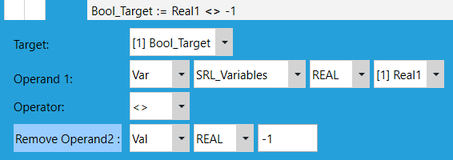
For Boolean operations, the expression in the G-code is converted to a SET_BOOLVAR block. The specified sign is taken for Boolean operations with numerical operands.
The expression Bool_Target = Real1 <> -1 is implemented as an SRL command as follows:
INFORMATION
A maximum of two operands are allowed in each operation. If more operands should be contained in an expression, this expression must be divided into several lines as follows:
The expression Bool_Target = (Pose_1.X > Pose_2.X) XOR FALSE becomes:
Bool_Target = Pose_1.X > Pose_2.X
Bool_Target = Bool_Target XOR FALSE
The following graphic illustrates the use of variables in the SRL program:

