Creation of the motion path
INFORMATION

The path is exported between program start and end of program.
Proceed as follows to create the motion path:
- Import or program the SRL program with the motion commands.
- The fastest way to create a simple motion path is by using the "Create pick-and-place program" functions. Here, the motion path only has to be parameterized. No programming knowledge is required for this. If the pick-and-place program is not sufficient to map the motion, all possibilities of MOVIKIT® Robotics can be exhausted (conveyor belt tracking, Touchprobe, etc.). The associated drive torques can be simulated for any path.
- Recommendation: Do not initially focus on adhering to the required cycle time. It is important for the robot to move along the correct path in the space. Therefore, initially assign default values to the motion parameter sets if these are still known (e.g. if only one cycle time is specified for the motion task).
- Optimize the cycle time of the motion based on the application requirement.
- To do this, adjust the motion parameter sets while respecting the application requirements for speed, acceleration and jerk.
- After the last movement to be performed has been completely run through once (program ended), its duration can be read out in seconds when you are logged into the IEC Editor under SEW_GVL.MyRobot_WorkbenchExporter.OUT.lrLastSequenceDuration_Sec, or in picks per minute when you are logged in under SEW_GVL.MyRobot_WorkbenchExporter.OUT.lrLastSequenceDuration_PicksPerMinute.
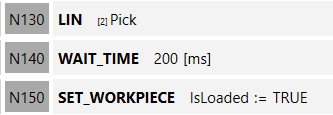
- Optional: Extension to include workpiece pickup and deposit (default value: workpiece not gripped)
- To do so, use the SET_WORKPIECE command if it has not already been added via the "Create a pick-and-place program" function. Set "IsLoaded" to TRUE when the pick-up position is reached, and to FALSE at the drop-off position. If there is no exact stop at these locations, the BOOL variable must be switched with a path event.