M functions
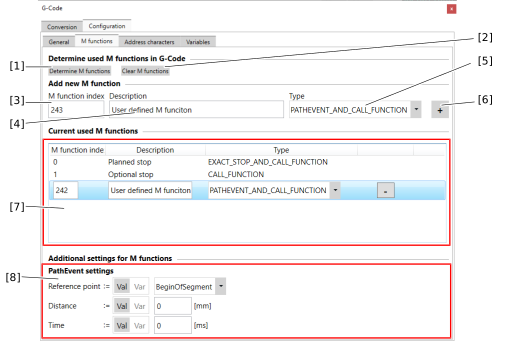

[1] | Search inserted G-code for M-functions in the text field or in the selected G-code file. Functions that are not present but permitted are automatically added to the list with the CALL_FUNCTION configuration. |
[2] | Delete all configured M functions. |
[3] | Specify the index of the M-function to be added. |
[4] | Specify the description text of the M-function to be added. |
[5] | Specify the type that determines how the G‑code import translates the M‑function into the SRL program.
|
[6] | Apply the entered configuration to the list. |
[7] | Overview of the configured M-functions. INFORMATION: To edit or delete an existing configuration, the line must be selected. |
[8] | Configuration options for path events (Pathevents) if the type PATH_EVENT_AND_CALL_FUNCTION was selected for the M-function. See Path event. |
