State diagram
The following diagram defines the standard behavior of the axis when several MotionControl function blocks are activated simultaneously. The combination of motion profiles is useful for creating complex profiles or handling exceptions within a program. In principle, motion commands are always executed one after the other, even if real parallel processing were possible. These commands affect the state diagram of the axis.
The axis is always in one of the defined states. Each motion command that causes a transition changes the state of the axis and therefore changes the way in which the current movement is calculated. A change of state is reflected immediately when the corresponding motion command is issued.
The following state diagram focuses on a single axis. The MC_Camin, MC_GearIn and MC_Phasing function blocks can be viewed in the state diagram as several single axes in specific states. The Camming master can be in the "ContinuousMotion" state, for example. The corresponding slave is in the "SynchronizedMotion" state. Coupling a slave axis to a master axis has no effect on the master axis.
Arrows within the state diagram show the possible state transitions. State transitions based on a command are represented by full arrows. Dashed arrows are used for state transitions that occur when an axis command has been completed or a system-related transition occurs (e.g. due to an axis error). The motion commands that set the axis to the corresponding motion state are listed above the states. These motion commands can also be sent when the axis is already in the corresponding motion state.
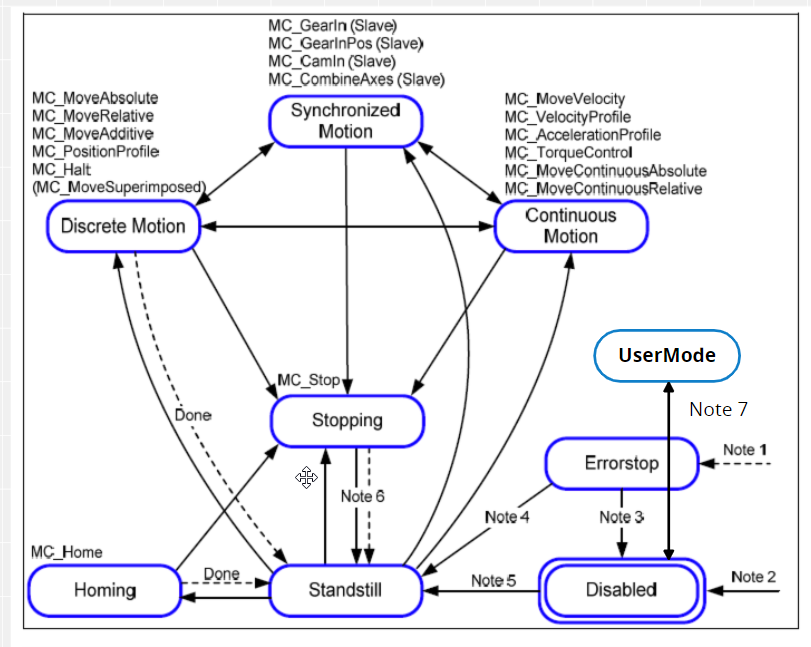

Note 1: | From every state. An error has occurred in the axis. |
Note 2: | From every state. MC_Power.Enable is FALSE and there is no error in the axis. |
Note 3: | MC_Reset.Status AND MC_Power.Status are FALSE |
Note 4: | MC_Reset.Status AND MC_Power.Status are TRUE AND MC_Power.Enable is TRUE |
Note 5: | MC_Power.Enable is TRUE AND MC_Power.Status is TRUE |
Note the following comments regarding the states:
- Disabled
- The "Disabled" state describes the initial state of the axis. In this state, the movement of the axis is not influenced by the function blocks. The supply system is switched off and there is no error in the axis.
- If the MC_Power function block is called with Enable TRUE while it is in the "Disabled" state, the state changes to "Standstill". Calling MC_Power with Enable FALSE in every state except "ErrorStop" will bring the axis to the "Disabled" state either directly or via another state. All current motion commands on the axis are canceled ("CommandAborted" state).
- ErrorStop
- The "ErrorStop" state has the highest priority and is jumped to from all other states in the event of an error. However, as long as the error is present, the "ErrorStop" state remains. With the "ErrorStop" state, the axis should be brought to an idle state if possible. No further motion command is accepted until a reset from the "ErrorStop" state has been performed. The transition to the "ErrorStop" state refers to errors in the axis and axis control, not to the instances of the function blocks. These errors from function block instances are output at the Error output of the function block.
- Standstill
- The drive is enabled, there is no error in the axis and no motion commands are active on the axis.
Note the following comments regarding the commands:
- MC_Stop
- Calling the MC_Stop function block in the "Standstill" state changes the state to "Stopping" and back to "Standstill" if Execute is FALSE. As long as the Execute input is TRUE, the "Stopping" state is maintained. The Done output is set after the stop ramp has been completed.
- MC_MoveSuperimposed
- The MC_MoveSuperimposed function block executed in the "Standstill" state switches the axis to the "DiscreteMotion" state. If the function block is called in a different state, the state of the axis is not affected.
- MC_GearOut, MC_CamOut
- Change the state of the slave axis from "SynchronizedMotion" to "ContinuousMotion". Calling one of these function blocks in a state other than "SynchronizedMotion" generates an error. Function blocks that are not listed in the state diagram have no influence on the state of the state diagram, i.e. the state does not change when they are called.
