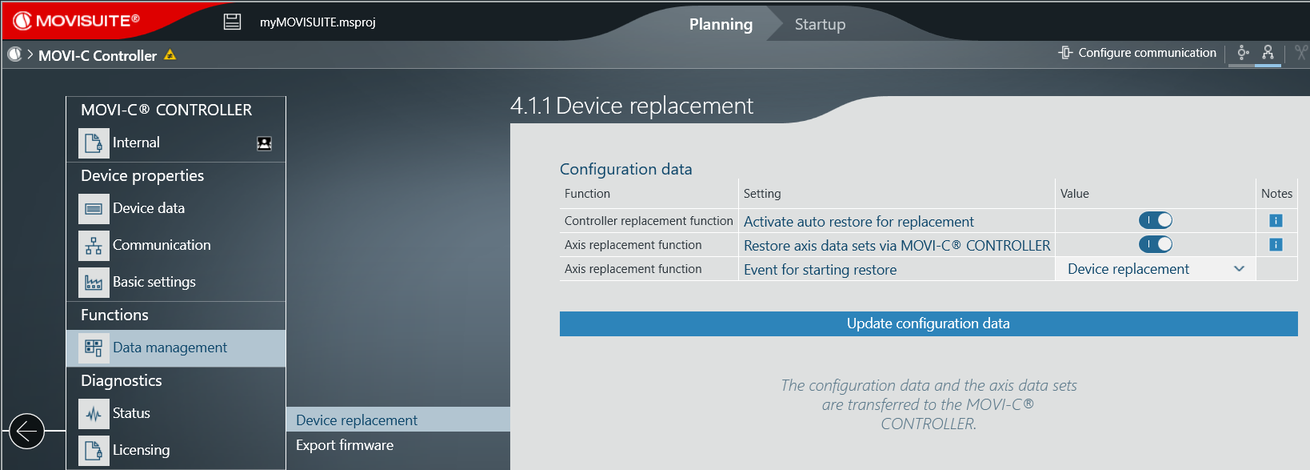
Setting up the automatic axis replacement function
The MOVI-C® CONTROLLER provides an automatic axis replacement function that automatically loads the inverter data sets stored on the MOVI-C® CONTROLLER to the new inverter in the event of an inverter replacement. It is recommended to perform this function at the end of startup and after having made changes to inverter parameters.
To use this function, proceed as follows:
- Create a MOVISUITE® project that contains the MOVI-C® CONTROLLER and the lower-level axes. Make sure that the names of the inverters in MOVISUITE® and the corresponding device slots in CODESYS are identical. See also Designation of devices.
- Open the configuration of the MOVI‑C® CONTROLLER in MOVISUITE®.
- To transfer the axis data sets to the (memory card of the) MOVI-C® CONTROLLER, click [Update configuration data].