Login and download
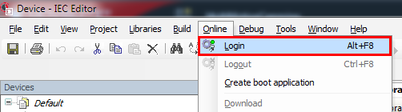
- Open the [Online] menu and click [Login]. You can also log in with the key shortcut <Alt> + <F8>.
- The IEC Editor performs the login to the MOVI‑C® CONTROLLER.
- After the login, a dialog opens asking you whether you want to download the program.
- Confirm the prompt with [Yes].
- To ensure that the program is still available after the MOVI‑C® CONTROLLER is switched off and on again, you must create a boot application. See chapter Creating a boot application.