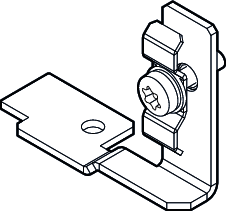
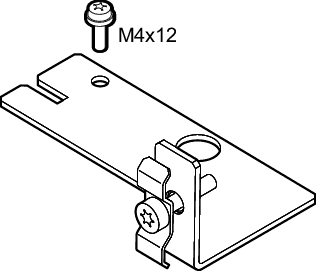
Fixation of Ethernet cables in connection box (X42/X43)
Mounting
Mount the enclosed retaining bracket as follows:
- Make sure that the Ethernet cables are strain-relieved and pressure-relieved after connection.
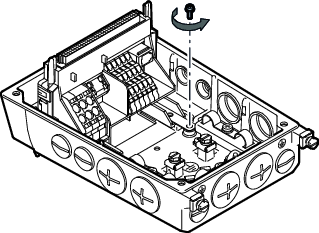
- Loosen the screw according to the following figure:
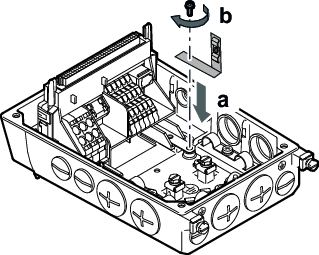
- Mount the enclosed retaining bracket with the previously loosened screw according to the following figure (tightening torque 2 Nm):
- Route the Ethernet cables into the connection box in such a way that the cables can be fixed with the retaining bracket.
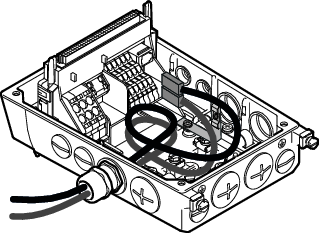
- Fasten the Ethernet cables to the retaining bracket according to the following figure:
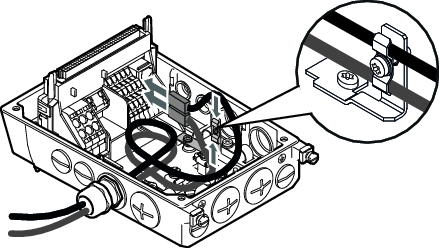
The retaining bracket is only used for mechanical fixation. The Ethernet cable is therefore fixed to the retaining bracket with the sheath.
Order information
Type | Image | Content | Part number |
|---|---|---|---|
Retaining bracket for Ethernet cable in connection box Size 1 |
| 1 piece | 28308123 |
Retaining bracket for Ethernet cable in connection box Size 2
Information: Use M4×12mm screw that is included in the delivery for mounting. |
| 1 piece | 28310527 |