Data container(s)
The data containers for collecting data on OPC UA servers are added and configured on the "Data containers" tab. The complete data model can be used on the OPC UA server here and searched in the software.
The data containers are used, for example, to specify the relevant data nodes on the OPC UA server (the data container is connected to a specified device, e.g. a MOVI-C® CONTROLLER with MOVIKIT® OPC UA), the update strategy, the triggers and the endpoints for saving the data. The software can run several data containers in parallel.
Each data event (parameter acquisition, scope recording) is stored separately in a JSON file. Each data container type has its own JSON file format, and a separate directory is created at the assigned endpoint for each instance of the software. The JSON files are assigned via a generated ID.
Information on the collected data volume at field level (OT network) and the transferred data volume (IT network) is displayed below the data containers.
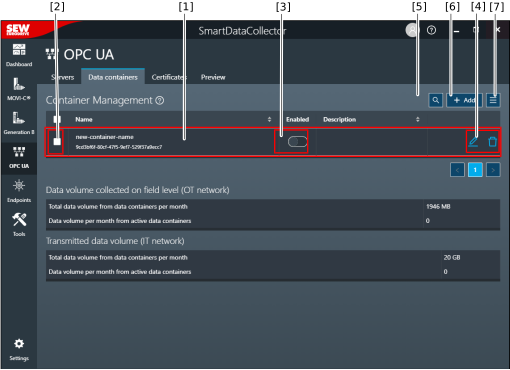

[1] | Created data containers with the name and description |
[2] | Select data containers for further processing [7] |
[3] | Enable or disable the data containers |
[4] | Edit or delete a data container INFORMATION: Objects that cannot be edited or deleted (read access only) are indicated by an "eye" icon. However, it is possible to create a copy of these objects. |
[5] | Function for filtering the displayed data containers |
[6] | Add a new data container |
[7] | Advanced functions (including import/export, enable/disable data containers, enable/disable data container endpoints) |
