Creating programs
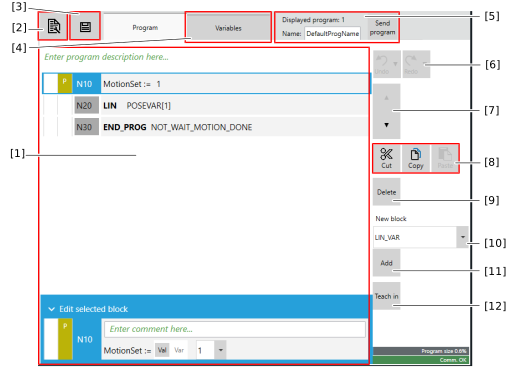

No. | Description |
|---|---|
[1] | Lines/command blocks added to the SRL program. |
[2] | Menu with additional functions for editing the program such as empty or Copy program, Load standard program, Importing/exporting an SRL program and Manual G-code import/export |
[3] | Options to Save the program |
[4] | Tab for editing variables |
[5] | Rename and manually send the program |
[6] | Undo one or more changes (add, delete, cut, copy, teach, move block) in chronological order (alternatively: CTRL+Z) or restore (alternatively: CTRL+Y). Multiple changes can be selected via the shortcut menu of the button (arrow to the right). |
[7] | Move selection one line up/down |
[8] | Cut selection (alternatively: CTRL+X), copy selection (alternatively: CTRL+C) or paste selection (alternatively: CTRL+V) |
[9] | Delete selection |
[10] | Select the command block to be added |
[11] | Add selected command block |
[12] | Save current position (teach) |
