Configuring a project
The following figure shows the described project setup for connecting 4 axis group members. Create such a project in MOVISUITE®.
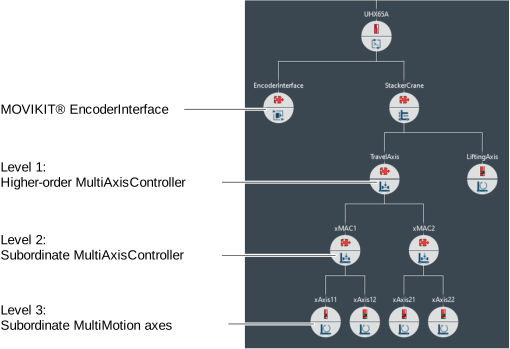

Configure the encoder evaluation of the exes as follows when doing this:
Level | Name of level | Encoder evaluation: External encoders | Encoder evaluation: Position controller | Encoder evaluation: External encoder settings |
|---|---|---|---|---|
1 | Higher-order ("TravelAxis") | - | Encoder source: | Type: "EtherCAT® encoder" with " EtherCAT® encoder source" member 1: "Name of MOVIKIT® EncoderInterface node" |
2 | Subordinate ("xMAC1" and "xMAC2") | Do not activate an external encoder | Encoder source: | - |
3 | Subordinate | Configuring a drive train with an external encoder | Activate position evaluation at the motor encoder in the drive train | - |
The external encoder must be incorporated via the separate MOVIKIT® EncoderInterface ("EncoderInterface"). The MOVIKIT® EncoderInterface does not require any additional license, and must be positioned on the left next to the MOVIKIT® StackerCrane effiDRIVE (see figure). Configure the MOVIKIT® EncoderInterface as follows:
Parameter | Value |
|---|---|
Type | Advanced |
Axis name | Axis with external encoder |
Number of decimal places | Same number as associated MultiMotion axis |
Generate the IEC project with MOVISUITE® after completing the configuration. See Generating an IEC project.
