IEC project structure
The IEC project has the following basic structure:
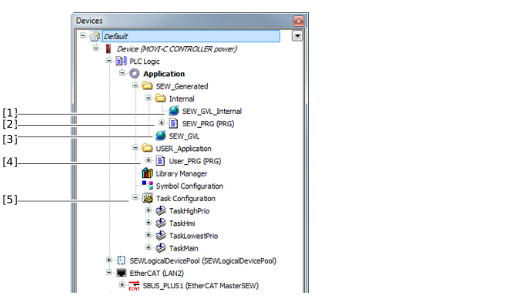

No. | Name | Description |
|---|---|---|
[1] | SEW_GVL_Internal | Global list of variables that contains the instances that match the software module used. These variables may not be written to from the user program. |
[2] | SEW_PRG | Program that contains all the important instance calls. Automatic code generation recreates this program in accordance with the configuration made in MOVISUITE® each time the IEC project is created, thereby overwriting the previous version. Therefore, you should not make any changes to this program. |
[3] | SEW_GVL | Global list of variables that is the interface for accessing the software module features. |
[4] | User_PRG | The user program is created once, initially, by automatic code generation. Since the program is not overwritten with each subsequent creation, this is the appropriate place for integrating user programs. The program is divided into five actions. These actions differ in the time at which they are called during the program sequence. |
[5] | Task configuration | List of tasks created in the project. Automatic code generation initially adds tasks that differ in how they are prioritized. The user can add additional programs to existing tasks or create new tasks. It is the responsibility of the user to design the capacity utilization of the tasks to enable the tasks to be processed within the required cycle time. If the cycle time is not adhered to, the setpoints for the interpolating axes are not provided in time. As a result, the axes can no longer be operated properly. |
