EnergyIntervalCounter
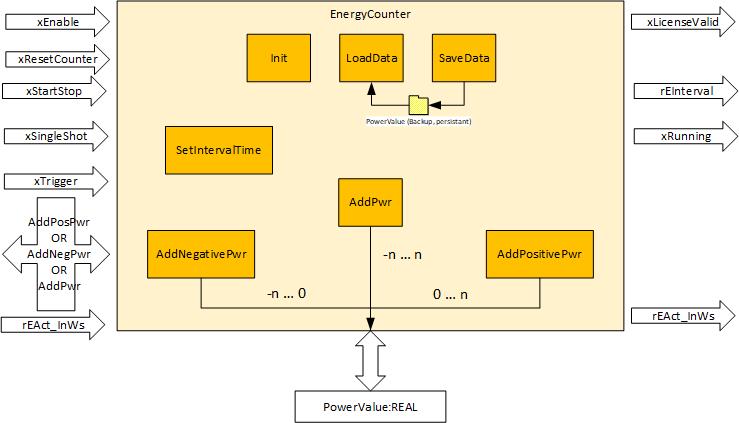

The EnergyIntervalCounter single counter offers the functionality of the EnergyCounter single counter as well as an interval function for defining a logging interval.
The rEAct_InWs counter variable can be modified externally for the EnergyIntervalCounter single counter. In this way, a new initial value can be specified after initialization or during operation.
To use the interval functions, the logging interval must be set once using the SetInterval() function. The logging interval can be set or changed as often as desired.
The EnergyIntervalCounter single counter has the following operating modes, which are activated using the variables xSingleShot and xStartStop as described in the following list:
- Free-running: xStartStop = "FALSE", xSingleShot = "FALSE”
- The rEInterval variable outputs the total of the last interval. The rEAct_InWs variable outputs the counter reading of the current interval. A trigger signal is ignored.
- Single shot: xStartStop = "FALSE", xSingleShot = "TRUE"
- The variables rEAct_InWs and rEInterval stop and wait for a positive edge of the xTrigger variable. If the xTrigger variable has the value "TRUE", then rEAct_InWs and rEInterval are set to 0 and rEAct_InWs starts to count. If the interval expires, the rEAct_InWs variable transfers its value to the rEInterval variable and is reset. As a result, the rEIntervall variable contains the energy from the interval starting from the trigger time. The value is valid if the xRunning variable has the value "FALSE" and xSingleShot has the value "TRUE". An additional measurement is possible only if xSingleShot has a positive edge.
- Normal: xStartStop = "TRUE", xSingleShot = "FALSE"
- The variables rEAct_InWs and rEInterval stop and wait for a positive edge of the xTrigger variable. If the xTrigger variable has the value "TRUE", the rEAct_InWs counter is set to 0. The rEInterval variable stops. If the interval expires, the rEAct_InWs variable transfers its value to the rEInterval variable and is reset. As a result, the rEInterval variable always contains the energy of the last interval. Each interval begins with a positive edge of the xTrigger variable. The xStartStop variable does not have to be reset for the next interval. This operating mode is the same as the "normal" operating mode of the oscilloscope.
- Incorrect operation: xStartStop = "TRUE," xSingleShot = "TRUE"
- A special case that should not occur. In this case, the function block also behaves like an oscilloscope and gives preference to the single shot (see above).
Variables for handling the energy meter, i.e. to activate and deactivate the function and to output status information.
Variable name | Description |
|---|---|
xEnable | Data type: BOOL |
| |
xReset | Data type: BOOL |
| |
xError | Data type: BOOL |
| |
xWarning | Data type: BOOL |
| |
udiMessageID | Data type: UDINT |
Message ID number | |
sAdditionalText | Data type: STRING |
Additional message text | |
xGetAccessControl | Data type: BOOL |
| |
xControlActive | Data type: BOOL |
| |
rEAct_InWs | Data type: REAL |
Current energy value in [Ws] | |
xResetCounter | Data type: BOOL |
| |
xRunning | Data type: BOOL |
| |
xSingleShot | Data type: BOOL |
| |
xStartStop | Data type: BOOL |
| |
xTrigger | Data type: BOOL |
| |
rEInterval | Data type: BOOL |
Total energy of the last measurement. The actual value is not available until the current measurement is completed |
