User interface

WARNING

Unexpected system behavior in the event of interrupted communication with the higher-level controller.
Death, severe injuries or damage to property.
- Make sure that the digital outputs control only those parts of the system that cannot give rise to hazardous situations.
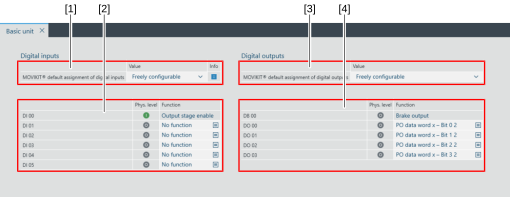
The following user interface is available for configuring the digital inputs/digital outputs:

No. | Description |
|---|---|
[1] | Select that the assignment of the digital inputs can be freely configured in the section [2] or use one of the standard assignments from the drop-down list. If a default assignment is first selected and then set to "Freely configurable", the functions of the default assignment are retained in the corresponding fields and the drop-down lists are unlocked to change the function. |
[2] | List of digital inputs with drop-down lists for assigning a function and displaying the physical level. Digital input DI 00 is permanently assigned the "output stage enable" function. |
[3] | Select that the assignment of the digital inputs can be freely configured via the range [4] or use one of the standard assignments from the drop-down list. If a default assignment is first selected and then set to "Freely configurable", the functions of the default assignment are retained in the corresponding fields and the drop-down lists are unlocked to change the function. |
[4] | List of digital outputs with drop-down lists for assigning a function and displaying the physical level. Digital output DB 00 is permanently assigned the "brake output" function. |
