Setting the DIP switches
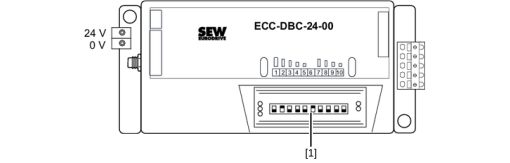

[1] | DIP switch |
There is an expandable and transparent protection cover above the DIP switches and the LED field of the binary control. Open the protection cover from the lower edge of the binary control to operate the DIP switches. Make sure that the cover is closed properly after setting the DIP switches.
DIP switch | Function | Button position | |
|---|---|---|---|
OFF | ON | ||
1 | Speed selection | See section DIP switches 1 to 5: | |
2 | |||
3 | |||
4 | |||
5 | |||
6 | Direction of rotation | CW | CCW |
7 | Selection acceleration/deceleration | See section DIP switches 7 to 10: Roller acceleration/deceleration | |
8 | |||
9 | |||
10 | |||
Additional information
