Blending
Blending is the rounding of the corners of a motion path. Blending ensures a continuous transition of the path and the path speed toward the next path segment. Blending protects the mechanical components and reduces the cycle time. Without blending, the kinematic model would stop at the target pose and then start its motion toward the next target point.
Blending to the new path segment starts as soon as the tool is close enough to the pose to which blending refers. For each path segment, the SRL program specifies the distance (blending distance) from which blending is applied to the subsequent path segment. However, this blending distance is limited to a percentage of the length of the new path segment on which blending is performed. The default value for this limitation percentage is 50%. However, the value can be increased to up to 99%.
This means the actual blending distance (blending distanceeffective) results from the smaller value (minimum) of the two variables, limited by the remaining distance at the time if the new path segment is taken over late (e.g. because of a wait point).
Note that the modal parameters set before an SLR motion command using SET_BLENDING_PARA for blending refer to the SRL motion command in the same way as the settings made in the SLR motion command itself. If the same parameter is set several times (e.g. blending distance), the setting in the last interpreted SRL command is used. Depending on the setting "Reference = BeginOfSegment or EndOfSegment", the parameters refer spatially to the start point or the target point of the motion segment. In the initial state, the reference is set to the start point, i.e. the blending parameters set with a specific motion segment (or modally before it) describe how blending is performed for this motion segment. If an SRL motion command with the setting "Reference = EndOfSegment" is followed by an SRL motion command with the setting "Reference = BeginOfSegment", the two parameter settings for blending refer to the same point. In this case, the MOVI-C® CONTROLLER uses the parameter setting of the last interpreted SRL motion command, which is the second one. If an SRL motion command with the setting "Reference = BeginOfSegment" is followed by an SRL motion command with the setting "Reference = EndOfSegment", then blending at the point between the two motion segments is not defined. In this case, the point will not be blended.
If, for example, in a pick-and-place application, there is blending from a long horizontal movement to a short vertical movement and the blending distance is limited by the limitation percentage to, for example, 50% of the short length of the vertical movement, the blending in the return movement can be greater than in the forward movement with the same parameterization, because of the greater length of the horizontal movement. If the resulting blending distance should be the same in the forward and return movements, it may be useful to increase the limitation percentage.
Blending distanceeffective = |
min (blending distancetarget, segment length ▪ limiting percentage, remaining distance) |
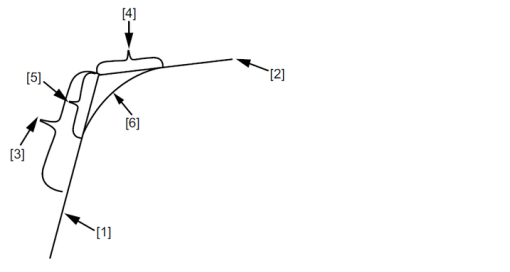

[1] | Linear segment to the first target position |
[2] | Target position of the second linear segment |
[3] | Set blending distanceTARGET |
[4] | Segment length * limitation percentage |
[5] | Blending distanceeffective |
[6] | Resulting symmetrical blending curve |
