Local file system or network
Observe the following information regarding access permissions when using this endpoint type:
- To save the recorded data on a network drive, the computer on which the software is running must have write rights on this network drive. The computer name must be added directly as an authorized security context in the properties of the network drive in the "Security" tab under "Group or user name".
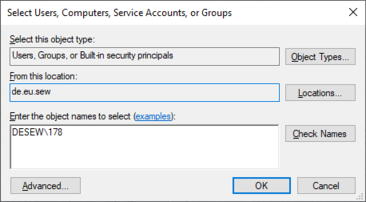

- Read and write rights must be entered for the "SmartDataCollector" user group for each network drive or local directory that is used as the endpoint.
- When using a network drive, refer to the extended information on communication with external endpoints in chapter Firewall rules.
The following setting fields are also available for the "Local file system or network" endpoint type:
Setting field | Description |
|---|---|
File system configuration | |
Folder base path | Select the directory path to save the recorded data. INFORMATION: For IT security reasons, the directory path |
Storage period | In order to avoid large amounts of data at the endpoint, specify how long the recorded data should be stored. Older data is deleted automatically. |
Maximum data size | In order to avoid large amounts of data, specify a maximum data size. If this limit is exceeded, the oldest data sets are automatically deleted. |
[Check access] | Check whether the selected storage destination can be accessed. |
[Initialize endpoint] | Create all of the required directories in the endpoint. |
