Defining the data structure or user-defined data type
Defining a data structure or a user-defined data type simplifies the process of integrating several instances because all variables then no longer have to be defined individually for each instance.
- Open the context menu of the "MBM_Visu" folder in the device tree.
- To add a new data type object, click [Add object] > [DUT...].
- The "Add DUT" context menu appears.
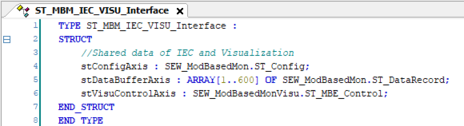
- Name the data type object "ST_MBM_IEC_VISU_Interface".
- In the "Data type" section, select the "Structure" radio button.
- The newly created data type object is displayed in the device tree.
- The tab for editing the data type object is opened.
- Create the following structure (INFORMATION: The size of the array can be adapted to individual requirements relating to recording period, storage space required and communication load):
- To save the IEC project, click [Save].
- Close the tab for editing the data type object.