Adding an IEC library
- The IEC Editor is open.
- The
SEW_DriveRadar_ModelBasedMonitoringVisuIEC package has been downloaded from Online Support and installed.
- Double-click the "Library Manager" object in the device tree of the IEC Editor.
- The Library Manager opens in a new tab.
- Click the [Add Library] button in the toolbar of the Library Manager.
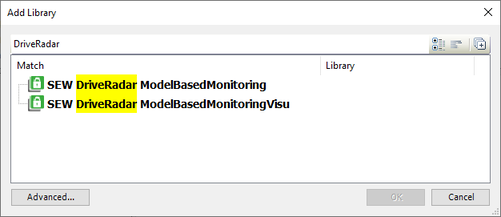
- The dialog box for selecting a library is displayed.
- Enter "DriveRadar" in the full text search field.
- The "SEW DriveRadar ModelBasedMonitoring" and "SEW DriveRadar ModelBasedMonitoringVisu" entries appear as results.
- Highlight the "SEW DriveRadar ModelBasedMonitoringVisu" entry and click [OK].
- The selected IEC library has been added to the IEC project.