Creating a global variable list (GVL)
INFORMATION

If you are using the software module in the stand-alone variant, the variables do not have to exist as global GVL variables, but can be declared locally in the "User_PRG".
- Open the context menu of the "MBM_Visu" folder in the device tree.
- Click [Add object] > [Global variable list...].
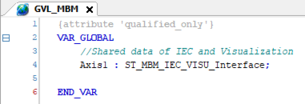
- Name the variable list "GVL_MBM".
- The newly created variable list is displayed in the device tree.
- The tab for editing the variable list is opened.
- Create the following instances for each axis that uses the software module:
- To save the IEC project, click [Save].
- Close the tab for editing the variable list.